---
title: "EDR Freeze on macOS"
description: "EDR Freeze came to Windows via debugging tricks. macOS has its own version using pid_suspend, and one subscription call stops it"
doc_version: "1"
last_updated: "2026-06-19"
canonical: "https://northpole.security/blog/edr-freeze"
---
[Back](https://northpole.security/blog)
Research • June 18, 2026 • By Pete Markowsky


Last year Picus Security unveiled [EDR Freeze](https://www.picussecurity.com/resource/blog/edr-freeze-the-user-mode-attack-that-puts-security-into-a-coma), a technique that can silently pause a security product on Windows so it stops alerting or responding to anything. The attack doesn’t crash the product or uninstall it. The process is still there, still looks healthy in every monitoring tool, but it just isn’t doing its job anymore. It’s a clever bit of work, and it doesn’t require exploiting a vulnerability in the operating system’s kernel.
While EDR Freeze is a Windows-specific attack, the underlying idea of suspending a security process to create a blind spot translates directly to macOS. Products built on Apple’s [Endpoint Security](https://northpole.security/glossary#endpoint-security) library face a similar risk if they don’t take one specific precaution: subscribing to the `ES_EVENT_TYPE_AUTH_PROC_SUSPEND_RESUME` event and denying `pid_suspend` calls that target their own process.
A note on prerequisites: A user must already have root on macOS to call `pid_suspend` against a system extension running as root. This is a post-exploitation technique, not an initial access vector. But if an attacker already has root and your Endpoint Security client isn’t defending itself against suspension, the consequences are significant. Also, `pid_suspend` has been part of macOS since Snow Leopard (10.6) and long predates the Endpoint Security library, so it’s not going anywhere.
*We presented this research at [NYC Sprawl 0x5](https://docs.google.com/presentation/d/1NiKnlLez7zyghEuu-GFphPWGkrVZk5286XK2-KN4JRk/edit?slide=id.g3e3dbb56ccf_0_170#slide=id.g3e3dbb56ccf_0_170). The slides are available [here](https://docs.google.com/presentation/d/1NiKnlLez7zyghEuu-GFphPWGkrVZk5286XK2-KN4JRk/edit?slide=id.g3e3dbb56ccf_0_170#slide=id.g3e3dbb56ccf_0_170).*
## Why `pid_suspend` Is So Effective
To understand why `pid_suspend` is such a potent primitive, it helps to know a little about how macOS is put together under the hood.
The macOS kernel (XNU) is a hybrid of two distinct layers. At the bottom sits the Mach microkernel, which manages the lowest-level abstractions: tasks, threads, ports, and IPC. On top of Mach sits the BSD layer, which provides the POSIX-compatible process model, file systems, networking, and the system call interface that most programs interact with. When you think of a “process” on macOS, you’re thinking of a BSD-level concept. Every BSD process is backed by an underlying Mach task that actually owns the threads and address space.
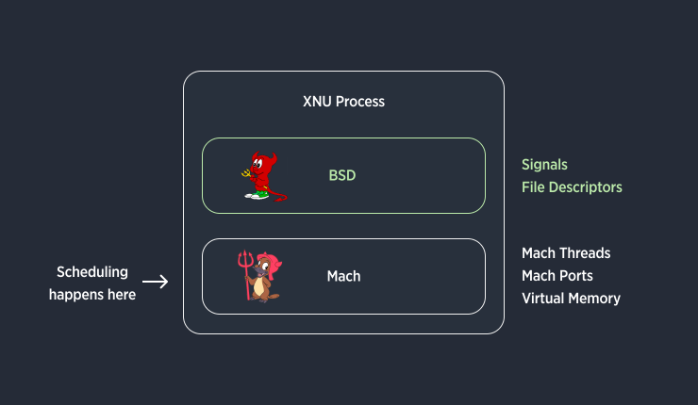
*Simplified Anatomy of a XNU Process*
`pid_suspend` operates at the Mach task level, not the BSD process level. When called, the kernel suspends the underlying Mach task directly, freezing all of its threads and pausing scheduling until `pid_resume` is called. Because this happens below the layer where user-land code runs, a suspended client can’t dequeue or respond to Endpoint Security events since its threads simply aren’t executing.
There’s another subtlety that makes this particularly reliable for an attacker: Mach task suspension is reference-counted. Each call to `pid_suspend` increments the task’s suspend count, and each call to `pid_resume` decrements it. A task only resumes execution when its suspend count drops back to zero. An attacker can call `pid_suspend` multiple times to ensure the target stays frozen, and a single errant `pid_resume` from elsewhere in the system won’t accidentally wake it up.
Crucially, a suspended task produces no visible side effects. Parent processes using the `wait()` family of syscalls won’t be notified that the target has stopped.
Because the Mach task is still technically alive, just not running, process accounting looks normal. Tools like `ps` and Activity Monitor will still show the process as present. From the outside, the security tool appears to be running, but it isn’t really doing anything.
## Bypassing Authorization Controls
When an Endpoint Security client subscribes to authorization events (`AUTH` events), macOS offloads the decision of whether to allow or deny an action to the client. The action is held up in the kernel until the client responds. If multiple clients are subscribed to the same `AUTH` event, all of them must respond before the action can proceed and a single “deny” result from any client is enough to block it.
An Endpoint Security client is supposed to respond with either `ES_AUTH_RESULT_ALLOW` or `ES_AUTH_RESULT_DENY`, and the Endpoint Security subsystem gives each client a deadline by which it must respond. If the client fails to respond in time, the OS kills it to prevent the system from deadlocking. Once the client is killed, and if there are no other clients that would deny the action, that action is allowed to proceed.
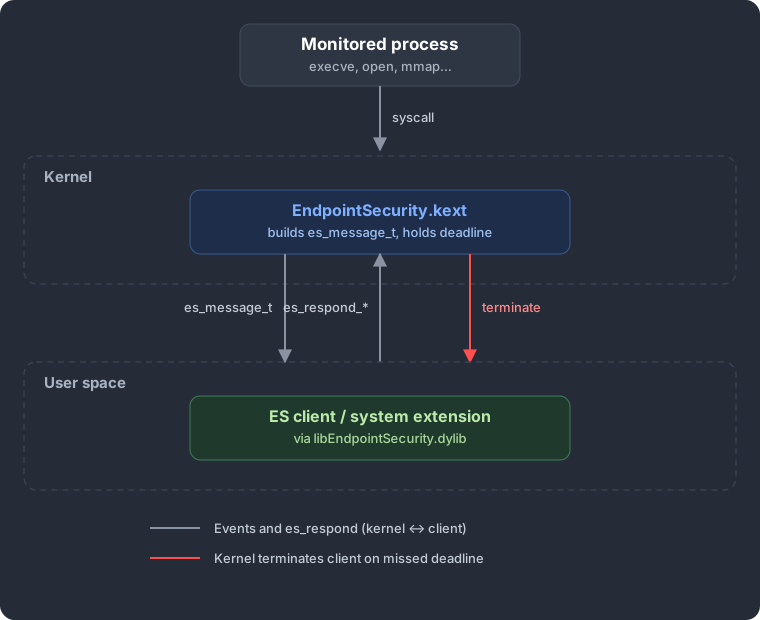 *How Endpoint Security events flow between the kernel and a user-space client. If the client misses its deadline, the kernel terminates it.*
Given these conditions, the “EDR Freeze” on macOS is straightforward:
1. Call `pid_suspend` against the Endpoint Security client process.
2. Perform the action that the client would normally block. The kernel dispatches the `AUTH` event to the now-suspended client, which sits there unable to process it.
3. Wait for the deadline to expire. The OS kills the stalled client, and since there’s no longer a client to deny the action, it goes through.
4. macOS will restart the Endpoint Security client process automatically, but it is too late to deny the action.
The OS does the attacker’s dirty work for them.
Here’s an example demonstrating how to use this to bypass a Santa rule. (Note: this is patched in Santa version 2025.12 and later.)
## Bypassing Detections
Authorization bypass gets the headlines, but `pid_suspend` also undermines notification-based detections, and the mechanism is arguably sneakier.
The Endpoint Security subsystem delivers `NOTIFY` events to clients via an internal per-client queue. If a client falls behind on processing, for example because all of its threads are suspended, that queue fills up.
The queue has historically had a default size of 3,072 events. Once it’s full, new events are silently dropped. The client never sees them.
An attacker who can suspend a process using the Endpoint Security library can exploit this to create a window where arbitrary actions leave no trace in the client’s event stream. But doing this cleanly requires some reconnaissance.
Step one is understanding the target. This strategy only applies when all subscribed ES events across all clients within the target process are `NOTIFY`\-only variants. If any client subscribes to `AUTH` events, the suspended process will be unable to respond to authorization requests within the required deadline, and the system will intervene to kill it.
Assuming the target is `NOTIFY`\-only, the next question is whether it subscribes to `ES_EVENT_TYPE_NOTIFY_PROC_SUSPEND_RESUME`. If so, the suspension event will be waiting in the queue when the client resumes, and a well-instrumented client could alert on that. The attacker also needs the broader subscription set to know which benign activity can fill the queue, and which malicious actions would generate telemetry to suppress.
Step two is filling the queue and acting. The queue starts empty when the client is suspended, so acting immediately just queues up evidence. The trick is to first generate a flood of benign events (file stats, reads against common paths, whatever the client subscribes to) until the queue is full. Only then do you perform the actions you want to hide. Those events are silently dropped because there’s nowhere left to put them.
Step three is resuming the client. The client wakes up, drains a full queue of benign events, and carries on. No alerts, no telemetry gaps, no suspicious log entries.
## How to Mitigate
There are a few things you can do when writing an Endpoint Security client, like Santa.
**Block it with Santa 2026.3**
**Since macOS 11 released in 2020, you can subscribe to `ES_EVENT_TYPE_AUTH_PROC_SUSPEND_RESUME` and deny calls targeting your own process.** This is the most direct mitigation. When you subscribe to this `AUTH` event, the OS will ask your client for permission before any call to `pid_suspend`, or `pid_resume` completes against the target process. If the target is your own PID, respond with `ES_AUTH_RESULT_DENY` to prevent being suspended.
```
case ES_EVENT_TYPE_AUTH_PROC_SUSPEND_RESUME: {
if (audit_token_to_pid(esMsg->event.proc_suspend_resume.target->audit_token) == getpid()) {
NSLog(@"Preventing attempt to suspend/resume Santa (type: %d. from PID %d, %s)",
esMsg->event.proc_suspend_resume.type,
audit_token_to_pid(esMsg->process->audit_token),
esMsg->process->executable->path.data);
result = ES_AUTH_RESULT_DENY;
}
break;
}
```
*How Santa protects itself from pid\_suspend in SNTEndpointSecurityTamperResistance.mm*
With Santa 2026.3 we’ve extended this protection to other processes. You can protect a process by using the `AntiSuspendSigningIDs` config option in your configuration profile. Simply add a snippet like the following:
```
AntiSuspendSigningIDs
ABCDE12345:com.example.app
```
This will then cause Santa to deny any attempt to use `pid_suspend` to stop that process.
**Check sequence numbers on your notification clients.** Every `es_message_t` includes two monotonically increasing sequence numbers: a “global” sequence number that increments for every event received and a “per-event” sequence number that is specific to the event type in the message. If your client observes a gap in two consecutive per-event sequence numbers (they differ by more than one), events were dropped. The global sequence number can help detect issues for low-volume event types and can be used to calculate the total number of dropped messages. This won’t prevent the bypass, but it gives you a detection signal that something went wrong. You can alert on non-sequential events, flag the gap in your telemetry, and investigate what happened during the missing window.
**Detect telemetry gaps server-side.** If the client reports to a fleet management server, the server side can detect when an endpoint goes silent. A sudden gap in sync data or event telemetry from a specific host, especially one that was previously reporting normally, is a strong signal worth alerting on.
**Monitor for deadline kills in Endpoint Security subsystem logs.** When the OS kills a client for failing to respond to an `AUTH` event before its deadline, it logs the termination. Monitoring for messages containing “EndpointSecurity client terminated because it failed to respond to a message before its deadline” gives you an after-the-fact indicator that something went wrong.
**Generate canary events and verify they arrive.** Periodically perform a known action (touch a sentinel file, exec a known binary) and verify that your client actually sees the corresponding event. If the expected event never shows up in your client’s event stream, your client may be suspended or its queue may be full. This is particularly useful for detecting the notification queue exhaustion bypass, where there’s no deadline kill to catch.
## How to Tell if a Product Is Protected
### Open Source Tools
Just search the source for `ES_EVENT_TYPE_AUTH_PROC_SUSPEND_RESUME` and trace it to the `es_subscribe` call. Also look for handling of the event and if it returns `ES_AUTH_RESULT_DENY`.
### Compiled Tools
Want to know if a compiled Endpoint Security-based tool subscribes to `ES_EVENT_TYPE_AUTH_PROC_SUSPEND_RESUME`?
The easiest way to test if a compiled ES client is susceptible is just to write a program to call `pid_suspend` against the target process. E.g.
```
// Tool to call pid_suspend and pid_resume for a given pid.
//
// Compile with clang -Wall -Wextra -O2 -o pid_control pid_control.c
#include
#include
#include
#include
#include
// macOS-specific functions for process suspension
extern int pid_suspend(int pid);
extern int pid_resume(int pid);
void print_usage(const char *prog_name) {
fprintf(stderr, "Usage: %s \n", prog_name);
fprintf(stderr, " suspend - Suspend the specified process\n");
fprintf(stderr, " resume - Resume the specified process\n");
fprintf(stderr, " pid - Process ID to control\n");
}
int main(int argc, char *argv[]) {
if (argc != 3) {
print_usage(argv[0]);
return 1;
}
const char *action = argv[1];
pid_t pid = atoi(argv[2]);
if (pid <= 0) {
fprintf(stderr, "Error: Invalid PID: %s\n", argv[2]);
return 1;
}
int result;
if (strcmp(action, "suspend") == 0) {
printf("Suspending process %d...\n", pid);
result = pid_suspend(pid);
if (result == 0) {
printf("Successfully suspended process %d\n", pid);
} else {
fprintf(stderr, "Failed to suspend process %d: %s\n", pid, strerror(errno));
return 1;
}
} else if (strcmp(action, "resume") == 0) {
printf("Resuming process %d...\n", pid);
result = pid_resume(pid);
if (result == 0) {
printf("Successfully resumed process %d\n", pid);
} else {
fprintf(stderr, "Failed to resume process %d: %s\n", pid, strerror(errno));
return 1;
}
} else {
fprintf(stderr, "Error: Unknown action '%s'\n", action);
print_usage(argv[0]);
return 1;
}
return 0;
}
```
If you run the program and do not get an error e.g.
```
$ sudo ./pid_control suspend 791
Suspending process 791...
Successfully suspended process 791
```
Then the process can be frozen and it will eventually restart when it encounters the timeout.
You can also run the `sysdiagnose` command on a Mac where the Endpoint Security tool is installed and running. In the resulting archive, look at:
```
logs/EndpointSecurity/EndpointSecurity.log
```
This log records which events each connected client has subscribed to. Search for event number **92**, which is the numeric value of `ES_EVENT_TYPE_AUTH_PROC_SUSPEND_RESUME` in the `es_event_type_t` enum. If you see it in the subscription list for the client in question, the product is at least subscribing to the event. (Whether it actually *denies* the call is another question, but subscribing is the necessary first step.)
If you don’t see **`92`**, the product is not protecting itself against `pid_suspend`, and the attacks described above may apply.
## How to Detect if This Is Happening
**Use Santa’s telemetry.** Santa emits a `proc_suspend_resume` telemetry event that carries everything you need to spot this. For a suspension attempt, the `Type` is `TYPE_SUSPEND`, the instigator is the process making the `pid_suspend` call, and the `Target` is the process being suspended.
Workshop customers can use a query like `SELECT * FROM proc_suspend_resume_2026 WHERE Target.IsESClient AND Type = 'TYPE_SUSPEND'` to quickly highlight attempts to freeze security tools.
**Monitor for `pid_suspend` calls using `eslogger`.** macOS ships with a command-line tool, `eslogger`, that lets you observe Endpoint Security events in real time. Running `sudo eslogger proc_suspend_resume` will produce detailed log output for each `pid_suspend` call, including which process issued it and which process was targeted. When reviewing the output, pay particular attention to the `team_id` and `signing_id` fields on both sides of the event, and filter for cases where `event.target.executable.is_es_client` is `true`. This indicates that the suspended process is itself a registered ES client.
```
{
"event_type": 93,
"time": "2026-03-23T12:48:32.819728417Z",
"process": {
"is_es_client": false,
"signing_id": "pid_control",
"team_id": null,
"executable": {
"path": "/Users/peterm/src/pid_control/pid_control"
}
// ... audit tokens, stat, tty, codesigning flags omitted for brevity ...
},
"action": {
"result": {
"result": { "auth": 0 },
"result_type": 0
}
},
"event": {
"proc_suspend_resume": {
"target": {
"signing_id": "com.northpolesec.santa.daemon",
"team_id": "ZMCG7MLDV9",
"is_es_client": true,
"executable": {
"path": "/Library/SystemExtensions/.../com.northpolesec.santa.daemon.systemextension/Contents/MacOS/com.northpolesec.santa.daemon"
}
// ... audit tokens, stat, parent info omitted for brevity ...
},
"type": 0
}
}
// ... seq_num, mach_time, thread, schema_version omitted for brevity ...
}
```
*Example Output of eslogger capturing a pid\_suspend of a debug version of Santa without protection*
## Takeaway
EDR Freeze demonstrated that suspending a security process is a viable evasion technique on Windows. The same principle applies to macOS and the Endpoint Security library. The fix is well-defined and has been available since macOS 11: subscribe to `ES_EVENT_TYPE_AUTH_PROC_SUSPEND_RESUME` and deny suspension of your own process.
If you’re evaluating a macOS security product, ask the vendor how they check for gaps. Also, run `sysdiagnose` and look for event 92 in the subscription list. If it’s not there, ask the vendor why.
macOS Security Endpoint Security EDR Evasion Threat Research Red Team pid\_suspend Malware Defense
## You may also like
[

Releases • June 8, 2026
Announcing Santa 2026.5
Santa 2026.5 adds sandbox profile rules, on-demand binary upload, CEL audit policies, and CEL fallback coverage for platform binaries.
](https://northpole.security/blog/santa-20265)[

Releases • June 8, 2026
Announcing Workshop 2026.5
Workshop v2026.5 introduces Seatbelt Rules in beta, multiparty approval on any method, a redesigned filter bar, and much more!
](https://northpole.security/blog/workshop-20265)[

Releases • May 20, 2026
Announcing Santa 2026.4
Santa 2026.4 expands tamper resistance, changes clean sync semantics, adds silenceable device notifications, and continues security hardening.
](https://northpole.security/blog/santa-20264)
## Sitemap
- [Home](https://northpole.security/index.md)
- [Workshop](https://northpole.security/workshop.md)
- [Santa](https://northpole.security/santa.md)
- [Features](https://northpole.security/features.md)
- [Cookbook](https://northpole.security/cookbook.md)
- [Docs](https://northpole.security/docs.md)
- [Blog](https://northpole.security/blog.md)
- [Glossary](https://northpole.security/glossary.md)
- [About](https://northpole.security/about.md)
- [Contact](https://northpole.security/contact.md)