
Process-Tree-Aware Rules, Network Monitoring, Telemetry Filters, and More
We’re excited to announce the latest Santa release! This version includes powerful new controls to secure endpoints, including process-tree-aware rules via CEL policies, network telemetry, telemetry filtering expressions, and additional usability and performance improvements.
Process Tree Aware Rules (Requires Workshop)
CEL (Common Expression Language) policies in Santa have been made even more powerful and can now make decisions based on process tree information. This new context enables fine-grained policies that go beyond what a binary is to consider how it got there, turning a simple allow/deny decision into a contextual one.
How It Works
When using CEL, you first craft a rule targeting a specific binary as you normally would, by selecting an appropriate rule type such as Team ID, Signing ID, or binary hash. However, the policy type is set to CEL instead of a typical “Allowlist” or “Blocklist” policy. Workshop provides a CEL editor with syntax highlighting and autocompletion to aid in writing complex policies.
A new field is available for CEL evaluation: ancestors. This field is a list of parent processes chained up to the root process (launchd), where each item contains signing and path information that can be referenced in a CEL policy.
Use Cases
- Reining in AI agent capabilities, limiting what binaries they can execute
- Disallowing shells/interpreters from being spawned from productivity apps (e.g. Excel/Word)
- Only allowing specific tools to be spawned by management agents, such as Puppet or Munki
- Scoping developer tools to IDEs
In the following example, we create a rule targeting Apple’s curl binary and allow it to run only when it isn’t executed by Claude:
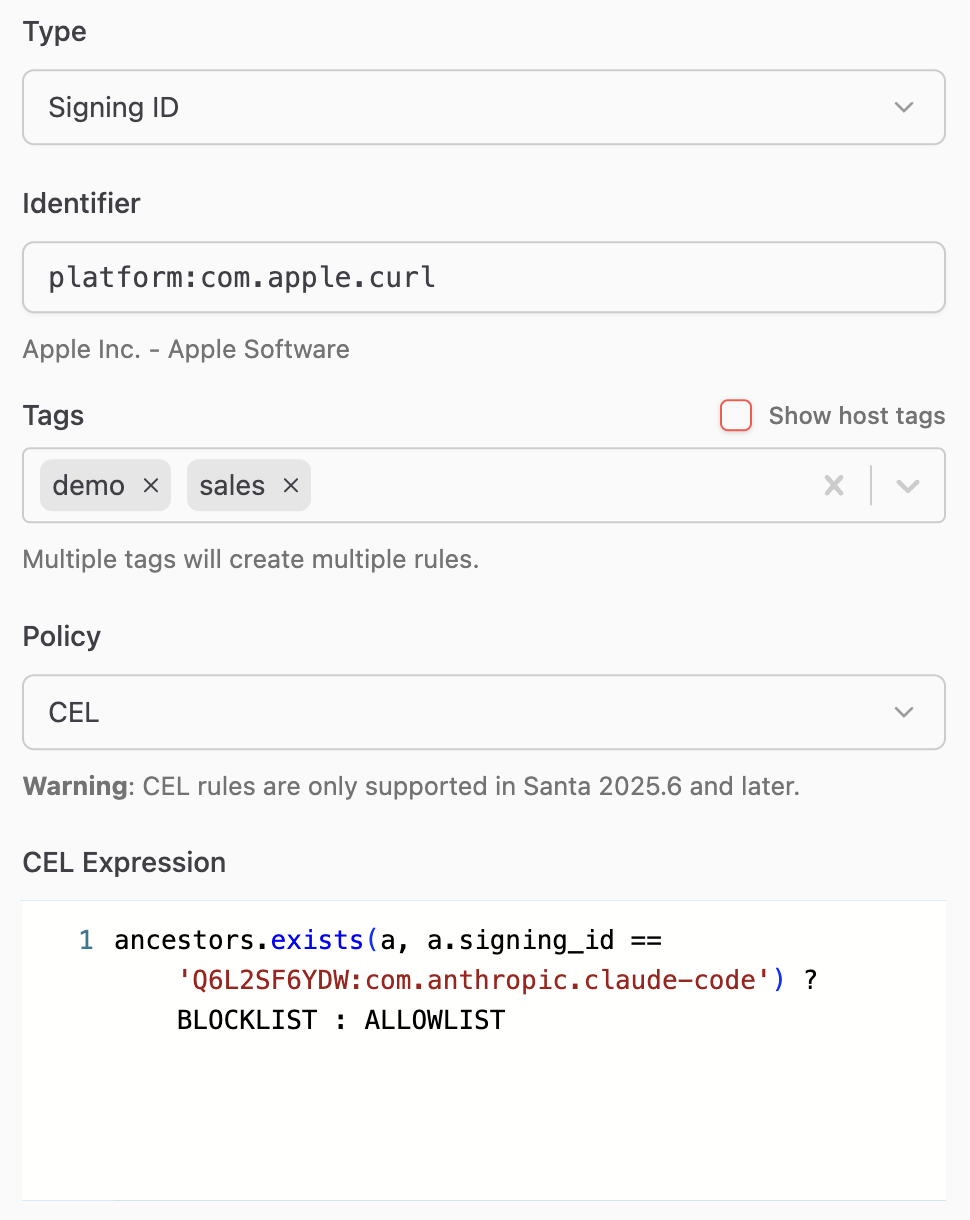
Note: This feature requires Workshop 2026.2 or later.
Network Telemetry (Beta, Requires Workshop)
Santa can now be configured to log network activity. This major new feature provides critical insight into network flows on a host, providing security teams with the information they need to hunt for threats and keep their environments safe.
North Pole Security will be rapidly expanding this capability to improve hostname resolution, enhance telemetry for the process associated with each flow, and soon, add the ability to blocklist and allowlist network traffic.
How It Works
Santa now contains a network extension daemon, santanetd, that monitors and records all network flows on the system. It also tracks active flows to report number of bytes sent/received as well as flow start and close times.
Workshop users can enable this either for specific tags or globally. The new network extension data will be exported along with the other security telemetry already collected by Santa.
Note: This feature requires Workshop 2026.2 or later.
Telemetry Filtering with CEL (Requires Workshop)
Not every event is worth exporting. Some processes execute thousands of times a day and generate telemetry that’s purely noise. Others contain sensitive information — command-line arguments with API keys, environment variables with database credentials — that you don’t want landing in a data lake where your entire security team (or a third-party SIEM vendor) can see it.
How It Works
Telemetry filtering lets you write CEL expressions that are evaluated against each event before it’s exported. You can do two things with them:
Drop events entirely. If an event matches your filter expression, it’s silently discarded and never exported. This is useful for cutting out noise — if you know that /usr/libexec/syspolicyd executes hundreds of times a day and you don’t need that telemetry, drop it:
has(event.execution) &&
    event.execution.Target.IsPlatformBinary &&
    event.execution.Target.CodeSignature.SigningID ==
        "com.apple.syspolicyd"
Redact sensitive strings. Instead of dropping the whole event, you can redact specific values from fields like command-line arguments and environment variables. If your developers frequently pass API tokens on the command line, you can scrub them before export:
has(event.execution) &&
    event.execution.Args.exists(
        arg,
        arg.contains("ghp_") && redact(arg, "ghp_(.*)"))
When a redaction filter matches, the sensitive value is replaced with a redacted placeholder. The event is still exported with all its other useful context — which process, which host, which user, when it ran — but the secret itself never leaves the machine.
You can configure telemetry filters per tag in Workshop, so different parts of your fleet can have different filtering policies. Your engineering team might need aggressive redaction of environment variables, while the rest of your fleet might just need noise reduction. You can also configure telemetry filters in the Santa configuration provided by your MDM.
Note: This feature requires Workshop 2026.2 or later.
Additional Improvements
Signing ID in CEL context
The Signing ID of the binary being executed is now available in CEL evaluation. This means you can attach a CEL policy to a Team ID rule and use expressions to target specific binaries within that team — for example, consolidating multiple Signing ID rules into a single Team ID rule with a CEL expression, or using CEL’s regular expression support to match Signing ID patterns with wildcards.
In this example, we can attach this CEL policy to a rule targeting the Google Team ID (EQHXZ8M8AV) to target all the currently shipping signing IDs for binaries within the bundle:
target.signing_id.startsWith(
    "EQHXZ8M8AV:com.google.Chrome") ||
target.signing_id in [
    "EQHXZ8M8AV:com.google.GoogleUpdater",
    "EQHXZ8M8AV:com.google.Keystone"]
? ALLOWLIST : BLOCKLIST
The example makes use of the startsWith function to match all binaries with the specific Signing ID prefix (EQHXZ8M8AV:com.google.Chrome) as well as the updater binaries.
Configurable Detail URLs and Text for File Access Rules
File Access rules now have their own fallback configuration for the dialog shown when a rule blocks an operation. You can set default button text (FileAccessEventDetailText) and a destination URL (FileAccessEventDetailURL) without needing to configure them on every individual rule. The URL string supports dynamic placeholders based on the event context so you can route users to relevant documentation or ticketing workflows automatically.
Transitive Rule Support for File Clone Events
Santa’s compiler/transitive rule feature automatically creates allow rules for Mach-O binaries produced by designated compiler processes. Santa will now also track file clone operations of compiler processes in order to create transitive rules. This provides greater coverage for toolchains that have moved to more modern APIs, such as rustc and cargo.
We’re committed to giving you the tools you need to secure your Mac fleet effectively. As always, we welcome your feedback and suggestions for future improvements.