
Encrypted Removable Media Policies, CEL Fallback Rules, Performance Improvements, and More
We’re excited to announce Santa v2026.3! This version introduces encryption-aware removable media policies, CEL fallback rules that ensure global policy is enforced even when no specific rule matches, and meaningful performance improvements driven by deep profiling work. It also includes expanded CEL capabilities, new diagnostic tooling, and several quality-of-life enhancements.
Encrypted Removable Media Policies
Santa can now enforce separate policies for encrypted vs. unencrypted removable media, giving admins the ability to ensure that only encrypted drives are permitted on managed hosts.
How It Works
When a removable volume is mounted, Santa inspects whether the volume is encrypted. Based on this, admins can configure distinct policies — for example, allowing encrypted drives to mount normally while blocking or remounting unencrypted drives as read-only. This allows organizations to enforce data-at-rest encryption requirements without blanket-blocking all removable storage.
Use Cases
- Compliance enforcement — Ensure that only encrypted removable media can be used, meeting regulatory requirements for data protection
- Data loss prevention — Prevent sensitive data from being written to unencrypted portable drives
- Graduated policies — Allow read-only access to unencrypted drives for data import while blocking writes, and full access to encrypted drives
Note: Encryption detection currently supports APFS volumes only.
CEL Fallback Policies (Requires Workshop)
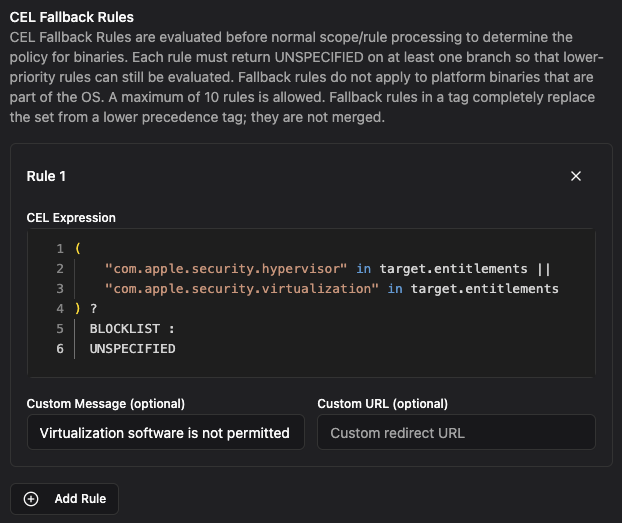
A common challenge in endpoint security is ensuring that a baseline policy is always enforced, even for binaries that don’t match any specific rule. CEL fallback policies solve this by letting you define global expressions that apply whenever no other rule matches.
How It Works
Fallback policies are CEL expressions that are evaluated only when Santa has no specific rule for a given binary. This means your targeted rules — Team ID, Signing ID, hash-based — continue to work exactly as before. But when a binary falls through without matching anything, the fallback expression gets the final say.
This is particularly powerful in Monitor Mode, where you may want to observe most activity but still enforce hard limits on certain categories of software.
Use Cases
- Block virtualization software — Apple requires the
com.apple.security.virtualizationentitlement for hypervisor access. A fallback rule can check for this entitlement and block, ensuring no VM software runs on managed hosts unless it has been explicitly allowlisted. This prevents unauthorized virtual machines that could be used to bypass endpoint security controls. - Block unauthorized network extensions — Software that provides VPN, content filtering, or DNS proxying requires Apple’s
com.apple.developer.networking.networkextensionentitlement. A fallback rule targeting this entitlement ensures that no unapproved network extension software can run, preventing data exfiltration through unauthorized VPN tunnels or bypassing of corporate network controls. - Block execution from untrusted paths — Using the
pathfield, block unmatched binaries that execute from common malware staging locations like/tmp,/private/var/tmp, or user Downloads folders. Legitimate software installed through proper channels won’t be affected since it would already be covered by a specific rule.
Note: This feature requires Workshop 2026.3 or later.
Performance Improvements
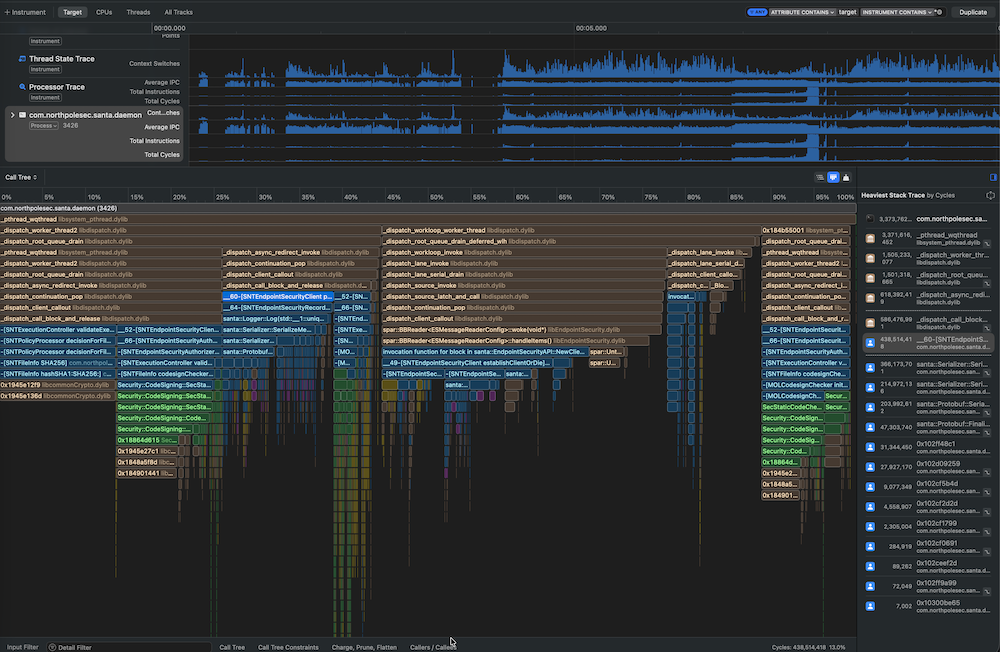
We invested significant time this release cycle analyzing CPU traces and flame graphs to identify and address performance bottlenecks. The result is a leaner, faster Santa that uses less memory and responds more quickly to authorization decisions.
These improvements are broad rather than tied to a single subsystem — they reflect the kind of careful profiling work that keeps Santa snappy as it takes on more capabilities with each release. Users should notice reduced CPU overhead and lower memory consumption, particularly on hosts with large rule sets or high event volumes.
Additional Improvements
Expanded CEL Capabilities
Several new fields and capabilities have been added to CEL policy evaluation:
pathandis_platform_binary— CEL policies can now evaluate the file path of the binary being executed and whether it is an Apple platform binary, enabling more precise targeting- Ancestor execution arguments (Workshop) — CEL expressions can now inspect the command-line arguments of ancestor processes in the process tree, making process-tree-aware policies even more expressive
- File descriptor information (Workshop) — CEL policies can now access file descriptor context for the process being evaluated, enabling policies that detect conditions like
stdinattached to a pipe or socket. This allows you to craft rules that prevent patterns likecurl | bash
santactl Enhancements
santactl doctorFAA validation — Thedoctorsubcommand now validates File Access Authorization (FAA) configurations, helping admins diagnose misconfigurations before they become problemssantactl fileinfoexpected decision — A new “expected decision” field shows whether Santa expects to allow or deny a given binary. Note that runtime characteristics (e.g., process tree context, CEL evaluation) may still result in a different decision being applied
Configurable pid_suspend Protections
Santa already protects itself against pid_suspend abuse, but we’ve received reports that other security-critical software may be vulnerable to this class of attack. Santa can now be configured with a set of signing IDs to extend these protections to other processes on the system. We’ll be sharing more details on this topic in an upcoming blog post.
Inventory Command (Requires Workshop)
Workshop now supports a new real-time command that triggers hosts to upload their installed binaries and bundles on demand. MDM configurations can also define the set of allowed real-time commands, giving admins control over which remote actions are permitted in their environment.
Block Reason in UI and TTY
When Santa blocks an execution, the reason for the block is now displayed directly in the UI dialog and TTY output, giving end users clearer context about why an action was prevented.
Telemetry Additions
pid_suspend and pid_resume events are now included in Santa’s telemetry export, providing visibility into when processes are being suspended and resumed during authorization decisions.
We’re committed to giving you the tools you need to secure your Mac fleet effectively. As always, we welcome your feedback and suggestions for future improvements.