
Protect your most sensitive files
Stop infostealers at the file system level with Santa and Workshop.



The threat
Infostealers are the #1 macOS attack vector
Infostealers exploded on macOS last year. Jamf's 2026 Security 360 report found they went from almost nothing to nearly a third of all Mac malware, with one family, Atomic Stealer, behind most of it. Their job is simple: grab your cookies, keys, and credentials and ship them off.

Browser and Slack cookies
Session tokens for Chrome, Safari, and Electron apps like Slack. They let attackers bypass MFA and impersonate users.
Keychains
Atomic Stealer copies Keychain database files to an unprotected directory and exfiltrates them to crack offline.
SSH and cloud keys
~/.ssh/, ~/.aws/, and ~/.kube/ hold passwordless access to production infrastructure. AMOS, Banshee, and Cthulhu all target them.
The problem
Any process can read anything you can
macOS has no built-in way to stop one user-space app from reading another's data. If an infostealer runs as you, it can read your cookies, your Keychain, your SSH keys, and your .env files.
Chrome cookie theft
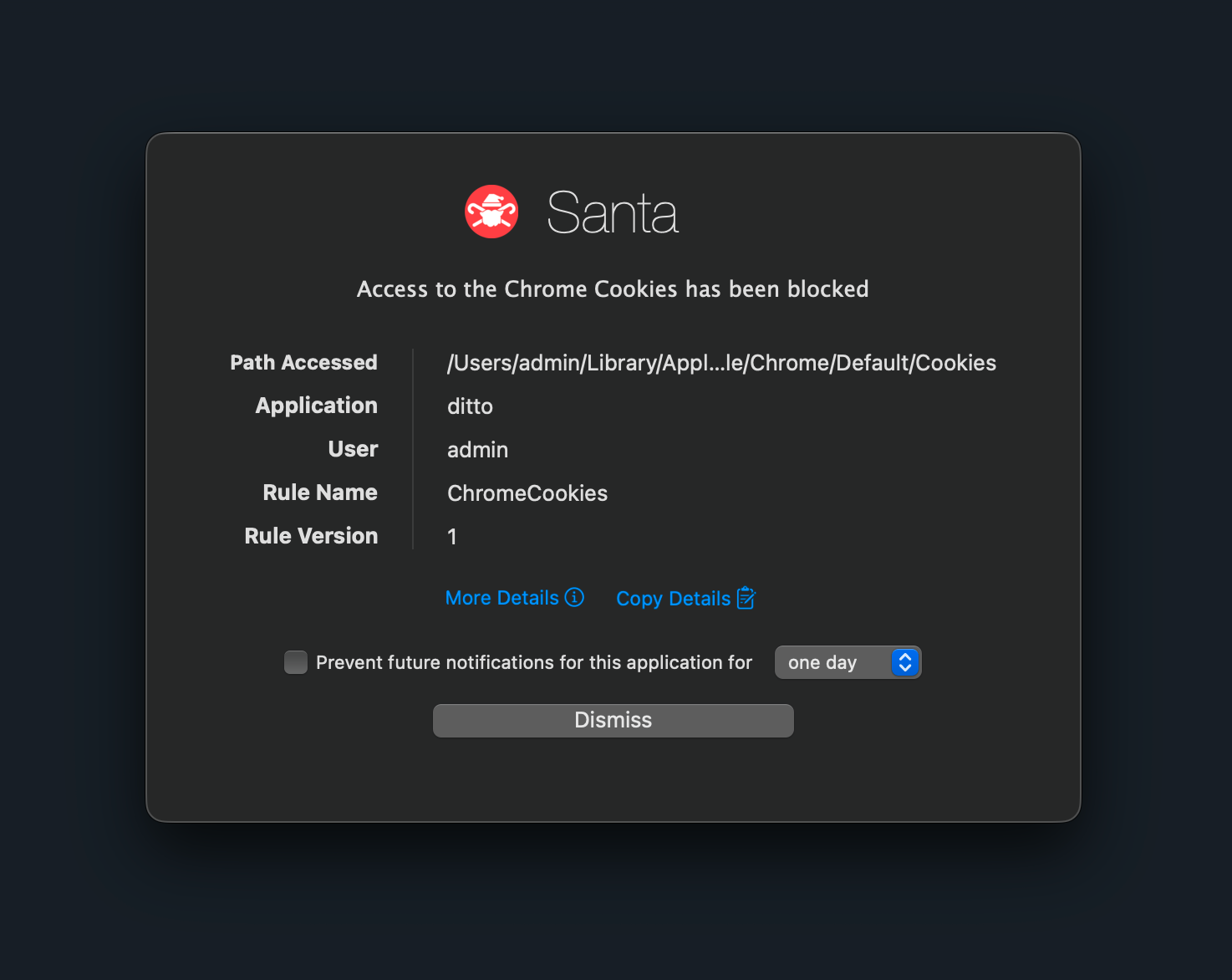
Atomic Stealer reads /Users/*/Library/Application Support/Google/Chrome/*/Cookies directly from disk. No browser process needed. Session tokens exfiltrated in seconds.
Keychain database copy
Rather than call the Keychain API, AMOS copies the raw database files out of ~/Library/Keychains/ to a temp path, then decrypts them offline after harvesting the user's login password via a fake prompt.
Sploitlight (CVE-2025-31199)
Attackers drop unsigned .mdimporter bundles into ~/Library/Spotlight to bypass TCC and read Apple Intelligence data, including geolocation and facial recognition caches.
Docker settings tampering
Modifying Docker Desktop's settings files enables headless container mode, letting attackers mount the Keychain as a volume and exfiltrate credentials without any UI.
The fix
File access rules
Define protected paths. Specify which processes can access them. Block or audit everything else at the file system level, before the data is ever read.
Without file access rules
Any process running as the user can read sensitive files.
- Atomic Stealer reads ~/Library/Cookies/, succeeds.
- AMOS reads ~/Library/Keychains/, succeeds.
- Infostealer reads ~/.ssh/id_rsa, succeeds.
- Malicious app reads ~/.aws/credentials, succeeds.
With file access rules
Only trusted processes touch sensitive paths. Everything else is blocked or logged.
- Chrome (signed) reads ~/Library/Cookies/, allowed.
- Atomic Stealer reads ~/Library/Cookies/, blocked.
- ssh and git read ~/.ssh/id_rsa, allowed.
- Infostealer reads ~/.ssh/id_rsa, blocked.
Configuration
Two ways to configure a rule
These are examples. Every rule can combine path patterns, process signing identities, and audit or enforce modes.
Data-centric
These apps can read this path. Lock down a sensitive file like /Users/*/Library/Application Support/Google/Chrome/*/Cookies and explicitly allow only Chrome's Team ID and Signing ID. All other reads are blocked. Best for locking down a sensitive file.
Process-centric
This app can only read these paths. Sandbox a tool like /usr/bin/rsync to ~/Backups/* and /tmp/* only. Everything else it tries to read is denied. Best for sandboxing a tool that should not roam.
Recipes
The paths attackers reach for, covered.
Battle-tested rules from our Advent Calendar and Santa cookbook, ready to drop into your fleet.
- 01
Browser and Slack cookies
~/Library/Application Support/Google/Chrome/*/Cookies and ~/Library/Application Support/Slack/Cookies. Allow only the owning app. Blocks session hijacking.
- 02
Keychain databases
~/Library/Keychains/. Audit mode: log any process reading raw Keychain files. Detects AMOS-style exfiltration.
- 03
SSH keys
~/.ssh/id_*. Allow only ssh, git, and your approved SSH clients. Deny everything else.
- 04
Cloud credentials
~/.aws/credentials, ~/.kube/config, and .env files. Allow only the relevant CLIs. Stops AI coding tools and malware from reading them.
- 05
Spotlight importers
~/Library/Spotlight and /Library/Spotlight. Restrict to Apple indexing processes. Mitigates Sploitlight (CVE-2025-31199).
- 06
Sudoers
/private/etc/sudoers and /private/etc/sudoers.d/*. Allow only sudo itself. Prevents silent privilege escalation.
- 07
Docker Desktop settings
~/Library/Group Containers/group.com.docker/. Allow only Docker's Team ID 9BNSXJN65R. Blocks headless-mode abuse.
- 08
Source code
~/Projects/secret-repo/. Protect proprietary code from exfiltration by unapproved processes.
- 09
1Password database
~/Library/Group Containers/*.1password/. Lock down the encrypted vault so other apps cannot enumerate entries.
Visibility
Full visibility into access attempts
Every allow and block is logged with process, path, signing identity, and timestamp. Review them in Workshop's Events view, baseline rules in audit mode before you enforce, and forward events to your SIEM.
-
Every decision logged
Process, path, signing identity, Team ID, and timestamp captured for every allow and block. Review them in Workshop's Events view.
-
Audit before you enforce
Run new rules in audit mode to see who and what would be affected before flipping the switch. No surprises when you turn enforcement on.
-
Streamed to your SIEM
File access events flow into Workshop's telemetry pipeline alongside binary executions, USB events, and process activity. One place to investigate, one place to alert.
File access authorization is part of Workshop
Pair it with binary authorization, approval workflows, and rich telemetry to protect every layer of your fleet.