
Social voting
Peer consensus, not a ticket queue
Workshop's social voting turns fleet-wide allow rules into a peer-driven decision. The Risk Engine gates every vote, so moving fast never costs safety.


The shift
A ticket queue does not scale
Allowlisting works. The part that breaks is the approval queue behind it. Social voting flips the problem: your coworkers, not a queue, do the initial vetting, and Workshop promotes safe software automatically once enough trusted peers have run it without issue.
Without social voting
Every new binary becomes a ticket. Security triages, approves, and moves on. The next developer who hits the same binary files another ticket.
- One ticket per application, and another ticket per new version
- One team becomes the bottleneck for every approval
- Minutes, hours, or days of latency before the app can be run
- Users learn to work around the block instead of through it
With social voting
The first user hits the block, the Risk Engine screens the binary, and peers cast votes in the browser or in Slack. Once the group threshold is met, voters get an allow rule. Once the tag-wide threshold is met, everyone in the tag gets the rule.
- Peer-driven validation, not a central queue
- Seconds to minutes of latency, most of it self-service
- One vetting conversation becomes a rule for everyone
- Security keeps policy control without handling every request
How it works
How voting works
Voting is a workflow on top of Workshop's approval workflows, with the Risk Engine gating every vote that gets cast.
A user hits a block
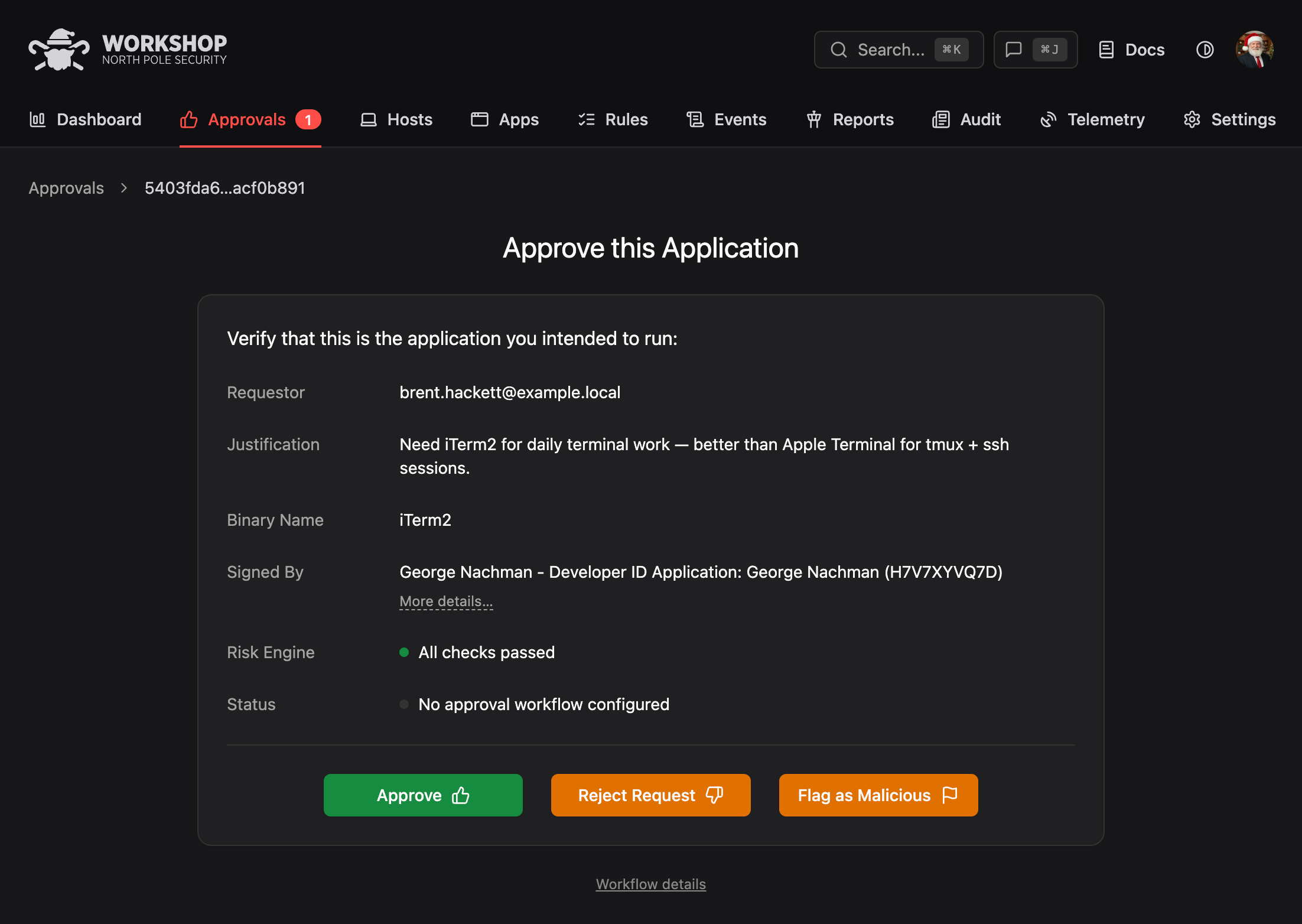
Santa blocks an unknown binary. Workshop opens an approval request and routes a prompt to the user in Slack or the browser.
The Risk Engine screens the binary
Workshop fans the binary out to every enabled Risk Engine plugin: VirusTotal, ReversingLabs, Blockable Rules, and any remote plugins. Any deny verdict kills the vote.
Votes accumulate against thresholds
Workshop tracks votes against per-tag and global thresholds. When met, the allow rule is promoted to the matching scope.
Thresholds met, rule promoted
The allow rule is keyed on the binary's most specific identifier. Once the everyone threshold is met, the next user in the tag never sees a prompt.

Safety floor
Malware is never voteable
Known malware is never eligible for voting. The Risk Engine blocks it before any votes are counted.

Scale
Why voting scales
Social voting is the approval pattern Santa was built for. It was used at Google for over a decade to keep 100,000+ Macs on lockdown without blocking legitimate work, and Workshop ships the same design, productized.
No central bottleneck
Security sets the rules for who can vote and what thresholds apply. Everything between block and fleet rule happens without a security engineer in the loop.
Distributed trust
Your teammates already know which tools are load-bearing for their work. A handful of independent peers running the same binary without issue is a stronger signal than one reviewer skimming metadata.
Auto-promotion
Once enough votes are in, Workshop writes the rule. The same binary never produces another approval request, and the same user never votes twice on the same software.

Safeguards
Fast votes. Upstream guardrails.
Voting is fast because the safety checks are upstream, not in the vote itself. Six things that hold even when peers move quickly.
- 01
Risk Engine gating
Every vote is checked against the full Risk Engine stack before it's counted. VirusTotal, ReversingLabs, CEL rules, and your custom webhook plugins all have a say. If any plugin denies, the vote is refused.
- 02
Malware is uncountable
A malware verdict overrides any amount of votes. The vote buttons are disabled and the attempt is logged with the user and host. This is a hard invariant, not a configurable setting.
- 03
Tag-scoped thresholds
Different parts of your fleet can vote at different thresholds. Production admins might need 20 global votes; a developer population might promote at 3.
- 04
Full audit trail
Every vote is logged with user, host, binary, timestamp, and the Risk Engine verdicts that were current at the time. Replay the decision from the Audit view whenever a compliance auditor asks.
- 05
Admin override
Security keeps the final word. Any promoted rule can be revoked, any binary can be force-blocked, and any user's vote can be reset. Admins can disable voting entirely for specific tags.
- 06
Revote on re-evaluation
If a Risk Engine plugin updates and flips a previously-passed verdict, Workshop re-evaluates the rule and surfaces it for review. Votes cast on stale intelligence don't survive fresh intelligence.
Channels
Vote where you already work
Voting meets people in the tools they already have open. Nobody has to remember another dashboard to log into.
Slack
Interactive message with app name, publisher, signing identity, Risk Engine verdicts, and vote buttons. Voting progress updates live. Approvers never leave the channel.
Workshop web UI
Full approval queue with filters for tag, risk verdict, vote count, and requester. Useful for high-volume approvers who want to batch through the pending list.
Audit
See the full vote history
Every vote, promotion, and override is recorded with the Risk Engine verdicts that were current when the vote was cast. Replay any approval later from Workshop's Audit view.
-
Per-vote audit
Who voted, on what binary, from which host, and at what time, alongside the live Risk Engine verdicts at the moment of the vote.
-
Rule promotion logged
Every threshold crossing is logged as its own audit entry, so you can trace exactly when and why a rule went tag-wide.
-
Replayable from audit page
Reconstruct any approval from the Audit view, with all overrides, vote resets, and threshold changes captured in one searchable trail.
Social voting is part of Workshop
Pair social voting with the rest of the platform to cover the full software lifecycle.