
Blocking OpenClaw
A layered approach to blocking Clawdbot, Moltbot, and OpenClaw with Santa

OpenClaw (formerly Clawdbot and Moltbot) is an open-source autonomous AI agent that runs on your desktop and connects to hundreds of services, such as Slack, Google Workspace, Notion, Outlook, and more. Users send messages through chat or schedule jobs, and the AI agent performs work and reports back to them. This broad access creates a security risk since a malicious prompt injected into any connected service could exfiltrate sensitive data from the others.
If your organization wants to prevent OpenClaw from being installed or run, here’s a layered approach using Santa CEL rules that covers all three names.
1. Block installation via a curl one-liner
The primary installation method is a shell script piped from curl:
curl -fsSL https://openclaw.ai/install.sh | bashCreate a SigningID rule on platform:com.apple.curl with a CEL policy:
args.exists(a,
  a.contains('molt.bot') ||
  a.contains('openclaw.ai') ||
  a.contains('clawd.bot')
) ? BLOCKLIST : ALLOWLIST
Recommendation: Add a custom message explaining why this is blocked, so users don’t attempt to work around it.
2. Block npm and Homebrew package installation
OpenClaw can also be installed via Homebrew or npm:
brew install openclaw
npm i -g openclaw
The package has been published under three names on npm: clawdbot, moltbot, and openclaw. Santa’s execution rules operate on executables, which include interpreters. A CEL rule on both bash and node looking for the package names in the arguments will catch most uses. For Homebrew, add a SigningID rule on platform:com.apple.bash with a CEL policy that blocks all three names:
(
  args.exists(a, a.endsWith('brew')) &&
  args.exists(a,
    a.contains('clawdbot') ||
    a.contains('moltbot') ||
    a.contains('openclaw'))
) ? BLOCKLIST : ALLOWLIST
For npm, add a SigningID rule on HX7739G8FX:node (or the signing ID of your node interpreter) with a CEL policy that blocks all three names:
(
  args.exists(a, a.endsWith('npm')) &&
  args.exists(a,
    a.contains('clawdbot') ||
    a.contains('moltbot') ||
    a.contains('openclaw'))
) || args.exists(a,
  a.endsWith('.bin/clawdbot') ||
  a.endsWith('.bin/moltbot') ||
  a.endsWith('.bin/openclaw')
) ? BLOCKLIST : ALLOWLIST
3. Block already-installed packages
macOS app
The macOS companion app has shipped under three different bundle identifiers as the project rebranded. Create SigningID rules for all three:
Y5PE65HELJ:com.clawdbot.macY5PE65HELJ:bot.molt.macY5PE65HELJ:ai.openclaw.mac
Or use a single TeamID rule on Y5PE65HELJ to cover all past and future app names from this developer.
npm package via Node
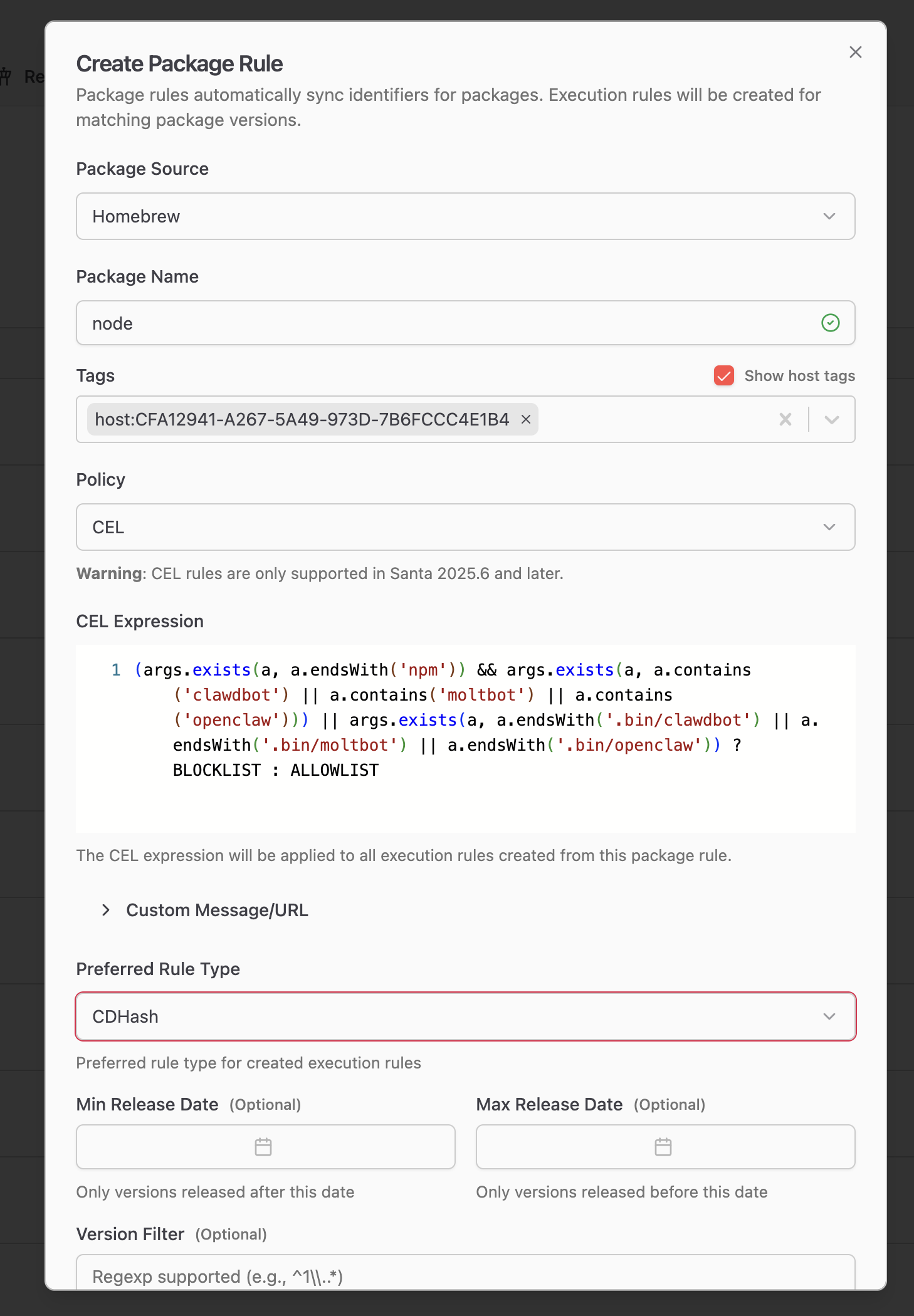
If the npm package is already installed, the HX7739G8FX:node rule from step 2 will block it from running. However, if your fleet uses a Homebrew-installed version of Node that isn’t signed by a publisher, you’ll need a different approach. A Workshop Package Rule can automatically create CEL rules for every version of Node packaged by Homebrew, achieving the same effect as step 2 without relying on a specific signing ID.
Summary
| Layer | SigningID | What it blocks |
|---|---|---|
| curl | platform:com.apple.curl | Download via install script |
| bash | platform:com.apple.bash | Homebrew install |
| node | HX7739G8FX:node | npm install and direct Node execution of installed package |
| macOS app | Y5PE65HELJ:* (TeamID) | Native app under all bundle IDs |
Disclaimer: Blocking based on package or directory names is not airtight. Motivated users can work around these rules by renaming packages or directories. However, this should block the majority of use cases while giving users a clear path for who to contact if they do get blocked.
Visibility into AI agents
As always, the full log of what is happening on the machine is available in the telemetry stream. Contact North Pole Security if you are interested in learning more about visibility into AI agents on your fleet.
You may also like

Announcing Santa and Workshop 2026.9
Santa and Workshop 2026.9 add process annotations that make Lockdown livable for developers, DNS rules, security key approvals, and much more

Apple made a list. Santa still checks it twice
macOS 27 adds native allow and deny lists for binaries. Apple is right that Macs need execution control, but a managed fleet needs more than a list.

Announcing Santa and Workshop 2026.8
Santa and Workshop 2026.8 add time based rules, a top-level Tags section, file access process overrides, sequence signals, and Nix package rules