
Announcing Santa and Workshop 2026.7
Expanded rule packs, richer Signals, package inventory, and much more

Santa v2026.7 and Workshop 2026.7 are available now. Where 2026.6 introduced a set of brand new capabilities, 2026.7 is about making them usable at fleet scale. Rule packs now cover every rule type Santa supports, which turns them into the shortest path to the more advanced parts of Workshop. Signals gained process tree context and the ability to reason across a window of time rather than a single event. And a new package inventory command answers a question Santa could not answer before: not what ran, but what is installed. Alongside those, this release brings redesigned Commands, telemetry queries in AI chat, and a longer list of smaller improvements.
Expanded Rule Packs
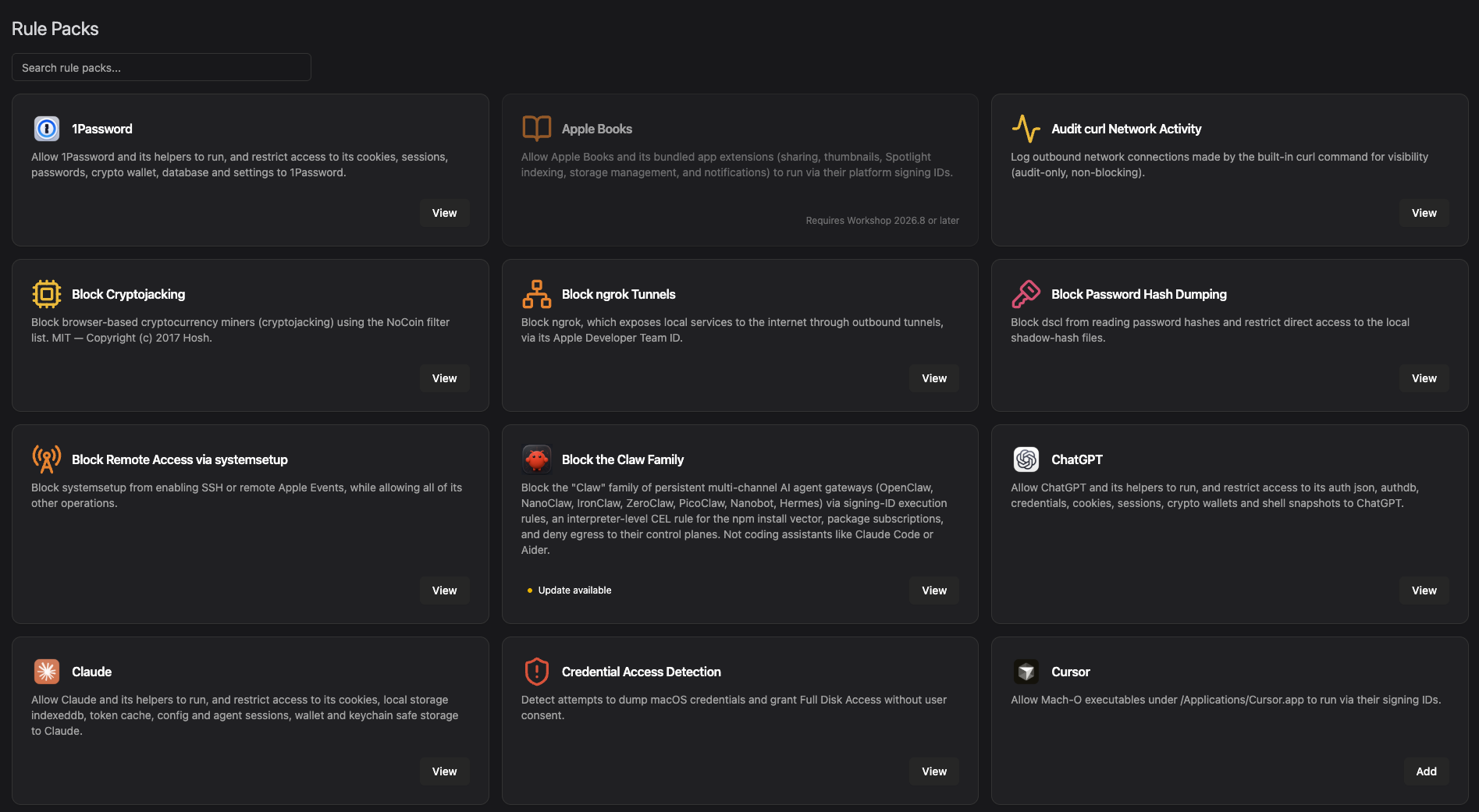
Rule packs let you subscribe to curated rule sets that we write and maintain, instead of authoring policy from a blank page. They shipped in 2026.6 with a handful of packs and one significant limitation: a pack could only carry execution rules. That limit is gone. Packs can now include every rule type Santa supports, and we’ve published a much larger library to work with.
The library covers both ends of that range. App packs like 1Password, Claude, ChatGPT, and Cursor let an app and its helpers run while restricting which processes can reach its cookies, sessions, and credential stores. Technique packs like Block Password Hash Dumping, Block Cryptojacking, Block ngrok Tunnels, and Credential Access Detection target a behavior rather than a specific piece of software, and Audit curl Network Activity does the audit-first version of the same idea, logging where the built-in curl connects without blocking anything.
Block the Claw Family is the clearest illustration of what a pack can do now that it can carry every rule type. It covers the persistent AI agent gateways in a single subscription: Signing ID execution rules for the known binaries, an interpreter-level CEL rule for the npm install vector, package subscriptions, and network rules denying egress to their control planes.
Why It Matters
Complete coverage of an application normally means touching multiple layers of Workshop: execution rules for what can run, file-access rules for what can read sensitive data, and network rules for where it can connect. Rule packs set policy across all of these layers at once, extending least privilege in a single step: lock down which parts of an app can run unattended, control which processes can reach sensitive files, and restrict the domains and IPs a process can talk to.
Pack rules materialize as standard, editable Workshop rules that stay in sync as new versions ship, so you get a vetted baseline you can tune without maintaining it yourself.
A pack is policy that has already been thought through, tested against real fleets, and kept current as the software it covers changes. Subscribing gets you the protection now, without a design exercise first.
How It Works
Simply subscribe to a pack in Workshop’s rules page by clicking the package you want and selecting the host tags to which the rules should apply. That’s it. The pack rules sync down to the hosts in the tags you targeted like any other rule, then stay current as we update the pack. Because a pack can now carry every rule type, one pack can express a complete piece of policy rather than only the execution slice of it. A single subscription can control whether something is allowed to run, restrict which processes are allowed to read its files, and constrain what it is permitted to reach on the network.
That breadth matters most for the file and network controls. Locking down a sensitive file, or pinning a process to a single destination, are exactly the rules that are easy to describe and fiddly to write correctly. They are now something you can adopt rather than build.
Use Cases
- Bootstrap a new deployment. Put a sensible baseline of common rules in place on day one instead of building policy from nothing.
- Protect sensitive files without authoring rules. Adopt a pack that restricts which processes can read credential stores, private keys, and other high-value files.
- Constrain what software can reach. Pick up network policy for common tools without working out every legitimate destination yourself.
- Learn by example. Read a pack’s rules to see how we would express a control, then write your own variant with confidence.
Improved Signals
Signals arrived in 2026.6 as near-realtime detection evaluated on the host. It was an early release: a signal looked at one event at a time, and when it fired, you got that single event. Two changes in 2026.7 make signals far more useful for real detection work.
Process Tree Context
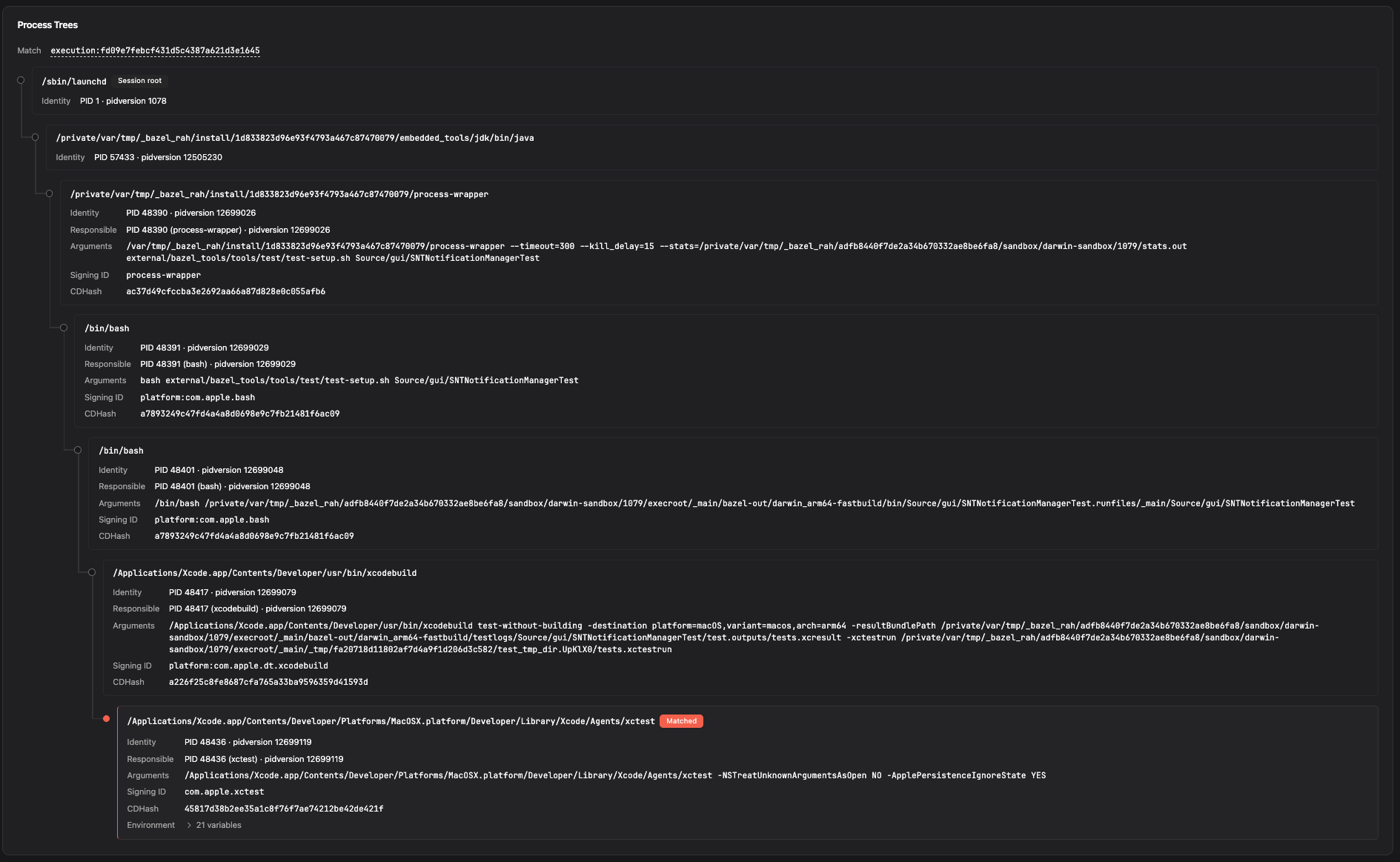
A signal match now carries a slice of the process tree along with the event, so you can see how the process came to exist rather than just that it ran. That includes the responsible process, surfaced directly in the signal, which is often the single most useful piece of context when you’re deciding whether a match matters. A script executing from a temp directory reads very differently depending on whether its lineage runs back to a package installer or to a browser.
This removes a whole step from triage. Instead of taking a signal to Workshop’s telemetry and reconstructing lineage by hand, you have the ancestry right there when you open the signal.
Windowed Signals
Signals can now be evaluated across a window of time. Rather than firing on a single matching event, a signal can require that a condition happens X times within Y before it triggers.
That makes a whole class of detections possible that single-event rules simply can’t reach. One failed authentication is noise; twenty in a minute is not. A single file read is normal; hundreds in quick succession from one process looks like a collection. Windowed signals let you write rules that match the behavior instead of ones that match ordinary activity, which means fewer alerts that exist only to be dismissed.
Use Cases
- Triage without a detour. Judge a match on lineage and responsible process without leaving the signal.
- Detect bursts, not events. Alert on rate and repetition, the shape most real attack behavior actually takes.
- Cut alert volume. Require a threshold before firing so single benign events stay quiet.
Note: Improved Signals require Santa 2026.7 and Workshop 2026.7.
Package Inventory
Santa has always been able to tell you what ran on a host. It could not tell you what was installed but sitting idle, and on a modern developer machine that is where a lot of the risk lives. A vulnerable dependency in a project’s node_modules, a browser extension nobody remembers adding, an MCP server wired into someone’s editor: none of it appears in execution telemetry until the moment it runs, and by then you’re reacting rather than planning.
2026.7 adds a package inventory command. Issue it to a single host or across an entire tag, and Santa enumerates the packages installed on those machines and uploads the results to telemetry, where they’re queryable alongside everything else Santa reports.
How It Works
The scan covers the places software actually accumulates on a Mac:
- Language ecosystems. Go, RubyGems, PyPI, npm, and Packagist.
- System package managers. Homebrew.
- Extensions. Browser extensions and IDE extensions.
- AI tooling. MCP servers and agent skills.
That last group is worth calling out. MCP servers and agent skills install like any other dependency, they typically run with the user’s full privileges, and they have been largely invisible to fleet tooling. They’re a genuinely new class of installed software, and this is the first release where you can see how much of it your fleet is carrying.
Because the inventory is a command, it benefits from the redesigned command handling described below: a scan issued to a host that’s currently offline runs when that host next checks in, transient failures retry on their own, and you get one view of progress across an entire tag. Run it once for a point-in-time picture, or re-run it on a cadence to keep the inventory current.
Results land in telemetry, so “which hosts have this package, at what version” becomes a query rather than a project. And because AI chat and MCP can now query telemetry directly, you can ask it in plain language.
Use Cases
- Respond to a supply chain advisory. When a malicious npm or PyPI release is disclosed, find every affected host by version instead of guessing.
- Inventory the AI surface. See which MCP servers and agent skills are installed across the fleet, and on which hosts.
- Find unmanaged software. Surface browser and IDE extensions that arrived without passing through any approval.
- Scope before you enforce. Understand what is actually installed before writing rules that constrain it.
Note: Package inventory requires Santa 2026.7 and Workshop 2026.7.
More in Workshop 2026.7
AI Chat and MCP can query Telemetry
Workshop’s AI chat and the MCP server can now query your telemetry directly. Previously they worked against Workshop’s configuration and inventory, which meant questions about what actually happened on a host ended with you opening telemetry and querying by hand. Now you can ask about host activity in the same conversation where you’re reasoning about policy, and follow a thread from a rule to the events it affected without switching context.
The chat interface also now shows tool calls as they happen, so you can see which questions the model asked of Workshop and what came back. When an answer looks surprising, you can check the work rather than guess at it.
We’ve also improved caching further, building on the work in 2026.6. Reusing cached context more aggressively means fewer tokens consumed for the same questions, which is lower cost against the API keys you bring and more room for follow-ups.
Lockdown Report Improvements
The redesigned Ready for Lockdown report shipped in beta in 2026.6, and the clearest piece of feedback was about volume: the report tells you what stands between a tag and lockdown, and then you work through it one item at a time.
You can now select in bulk and create rules for many entries at once, so clearing a long list is a handful of actions instead of a long afternoon. The report also exports to CSV, which makes it easy to share the remaining work with an application owner, track it in a spreadsheet, or hand it to whatever your team already uses to divide up work.
Additional Improvements
- Redesigned Commands. Commands have been rebuilt around the reality that hosts go offline and things fail. A command issued to an unreachable host is queued and delivered on its next check-in rather than lost, transient failures retry automatically, and every command carries an expiry so a stale request doesn’t fire weeks later against a host that has moved on. The interface is new too: pending, in-flight, completed, expired, and failed states are all visible, with one view of progress when you target a whole tag.
Getting Santa and Workshop 2026.7
Santa 2026.7 is available now on GitHub, with deployment guidance in the getting started guide. Workshop 2026.7 is available now to all Workshop customers. As always, we welcome your feedback and suggestions for future improvements.
You may also like

Announcing Santa and Workshop 2026.8
Santa and Workshop 2026.8 add time based rules, a top-level Tags section, file access process overrides, sequence signals, and Nix package rules

Announcing Santa & Workshop 2026.6
Santa and Workshop 2026.6 add network rules, privilege management, Signals, webhooks, a redesigned Ready for Lockdown report, and more

Announcing Santa 2026.5
Santa 2026.5 adds sandbox profile rules, on-demand binary upload, CEL audit policies, and CEL fallback coverage for platform binaries.