
Announcing Santa 2026.5
Sandbox Profile Rules, On-Demand Binary Upload, CEL Audit Policies, and More

We’re excited to announce Santa v2026.5! This release gives security teams more ways to both enforce and observe policy: a new sandbox profile rule type that confines a binary to a least-privilege profile, an on-demand binary upload command built for incident response, CEL audit policies that record activity without blocking it, and broader CEL fallback coverage that now includes Apple platform binaries. The bulk of this release’s new capabilities are available to Workshop customers.
Sandbox Profile Rules (Beta, Requires Workshop)
AI tooling has quickly become part of everyday work, and much of its value comes from letting it operate with little supervision. That autonomy is also the risk: an agent that can run commands on a user’s behalf is powerful right up until it does something it shouldn’t. Administrators need to let people use the tools they depend on while still guaranteeing those tools stay within safe, well-defined boundaries, whether that is an AI agent, a scripting interpreter, or a build tool. Santa 2026.5 introduces a new rule policy for exactly this, letting you allow a binary to run while confining what it can do once it does.
How It Works
Sandbox profiles are a new policy type for a rule, alongside the familiar Allowlist, Blocklist, and CEL policies. You target a binary the way you normally would, by Team ID, Signing ID, or hash, and attach a macOS sandbox (seatbelt) profile to the rule. When a matched binary executes, Santa ensures it runs confined to that profile. Executions that would escape the profile are stopped.
A sandbox profile is written in the standard macOS sandbox profile language. A common security-conscious case is a tool that should only ever read the current user’s files and has no reason to touch the network at all. Profiles can also reference placeholders that Santa fills in at runtime, so one profile adapts to whichever user the binary runs as instead of hardcoding a path. This profile denies everything by default, allows just enough for the binary to launch and read within the user’s home directory, and blocks the network:
(version 1)
(deny default)

;; Inherit Apple's base profile so the binary can start up and reach
;; the core OS services every macOS process needs.
(import "system.sb")

;; The profile must permit the confined binary's own launch. Scoping
;; exec to its path lets it start while still preventing it from
;; spawning any other program.
(allow process-exec*
    (literal "/usr/local/bin/acme-agent"))

;; Read files only within the current user's home directory. The HOME
;; placeholder is resolved at runtime, so this same profile works for
;; any user without hardcoding a path.
(allow file-read*
    (subpath (param "HOME")))

;; Block all network access. A tool confined this way cannot
;; exfiltrate data or reach a command-and-control server, even
;; if it is compromised or abused.
(deny network*)
The profile denies everything by default, then grants only what this tool needs. Importing system.sb gives the binary the baseline that every macOS process relies on just to start and run, because Santa hands the profile to the sandbox with no base of its own. Allowing exec of only the binary’s own path lets it launch while preventing it from spawning any other program. Reads are confined to the user’s home directory, and the network is denied outright, so even a compromised tool has no path to send data off the host. Real profiles will be tailored to the tool you’re confining.
(param "HOME") is a placeholder. Rather than baking a path like /Users/alice into the profile, you write (param "HOME") and Santa substitutes the right value for the user the binary runs as. Santa currently exposes four placeholders:
| Placeholder | Resolves to |
|---|---|
HOME | The home directory of the user the binary runs as |
CWD | The binary’s current working directory |
TMPDIR | The per-user temporary directory |
UID | The numeric user ID of the user the binary runs as |
Reference any of them with (param "NAME") anywhere a path or value would normally go, for example (subpath (param "TMPDIR")) to scope access to the user’s temporary directory.
Most real tools need more than file access. The harder part is the set of system services a process quietly relies on: reading preferences, writing logs, evaluating certificate trust, and looking up users and groups. Importing system.sb covers that baseline. Beyond it, a tool that talks to other daemons, opens specific devices, or loads its own bundled libraries needs matching rules, such as (allow mach-lookup ...), (allow iokit-open ...), or file-read* and file-map-executable. The practical approach is to start from a working base, watch for sandbox denials on the macOS versions you support, and tighten from there.
Use Cases
- Constrain unsupervised AI tooling. Let agentic tools run autonomously while strictly limiting what they can read, write, and reach on the network, even with no human in the loop. The same approach reins in interpreters and scripting runtimes.
- Reduce blast radius. Limit the damage a compromised or abused but otherwise legitimate tool can do.
- Enforce least privilege. Pin a binary to exactly the access it needs, without blanket-blocking it.
Note: This feature is in beta and requires Workshop 2026.5 or later.
On-Demand Binary Upload (Beta, Requires Workshop)
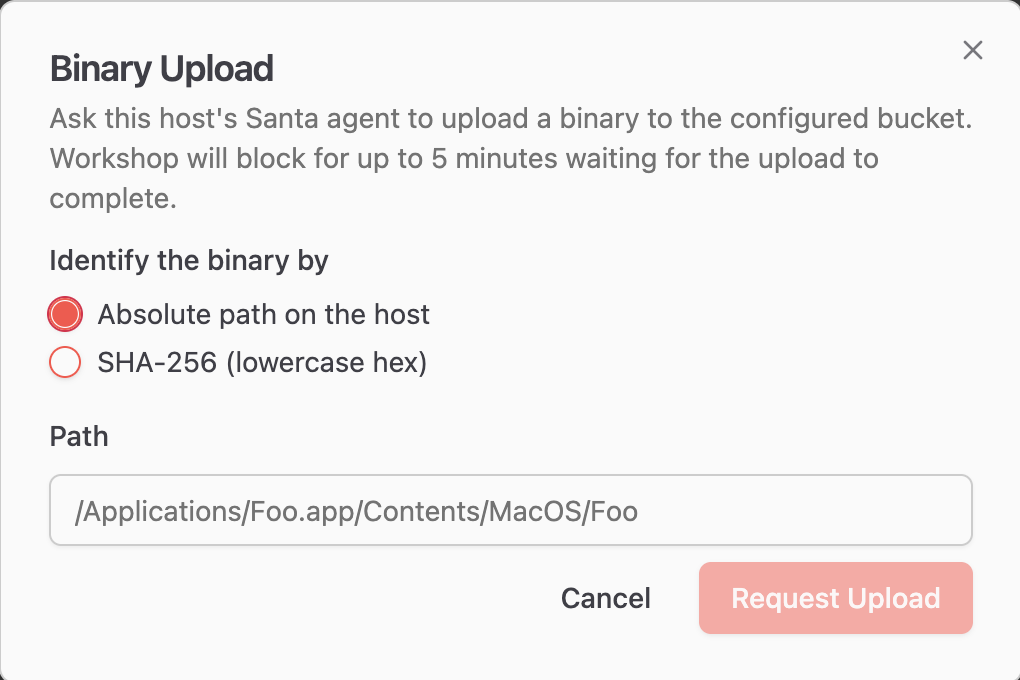
When an unfamiliar binary shows up in your telemetry, the next question is usually “what is this thing?” Santa 2026.5 makes answering that question faster. You can now request a specific binary from a host on demand. The request reaches the host in real time over push notifications, and the host uploads the binary to cloud storage, with no manual access to the endpoint required.
How It Works
From Workshop, there are two ways to request a binary. When you are reviewing an execution event for a binary on a particular host, a button on that page triggers the upload directly, since Workshop already knows which binary you mean. You can also start from the host’s page, which lists the commands that can be sent to that host. Selecting binary upload opens a modal where you provide details about the binary you want, and Workshop sends the command once you confirm.
Either way, the command is delivered immediately to the host over its push connection, and the host uploads the requested binary for analysis. As with the other real-time commands introduced in 2026.3, the set of commands a host will honor is governed by the allowed real-time commands in its MDM configuration, so you stay in control of which remote actions are permitted in your environment.
Use Cases
- Malware analysis. Pull an unknown binary for inspection the moment you spot it.
- Investigate a block. Retrieve the exact binary behind a blocked execution event.
- Faster investigations. Collect what you need without coordinating manual access to the endpoint.
Note: This feature is in beta and requires Workshop 2026.5 or later.
CEL Audit Policies (Requires Workshop)
CEL policies have always answered a yes or no question: should this execution be allowed or blocked? Santa 2026.5 adds a third answer. A CEL policy can now return AUDIT, which lets the operation proceed but records an event describing what happened. You get visibility into a condition without getting in anyone’s way.
How It Works
In addition to ALLOWLIST and BLOCKLIST, a CEL expression can now evaluate to AUDIT. An AUDIT result lets the execution proceed but emits an event to your sync server, giving you visibility into the condition after the fact. Like all Santa events, AUDIT events sent to the sync server are only a sample of the actions Santa takes. For the full, unfiltered account, rely on Santa’s telemetry stream.
For example, this policy records an event whenever a binary executes from a temporary directory, without preventing it from running:
target.path.startsWith("/private/tmp/")
    ? AUDIT : ALLOWLIST
AUDIT is also a good fit for gray areas: conditions that are not necessarily against policy but are unusual enough to deserve a closer look. For example, like other Electron apps, Slack can be launched with Node inspector or Chromium remote-debugging flags. Those flags let a local process attach to Slack and run code in its context or read its session tokens, inheriting whatever access the app already holds. A launch like that is rare and worth knowing about, whether it turns out to be a developer debugging something or the opening move of an attack. You could block it outright, but auditing it instead keeps visibility while you investigate, rather than committing to a verdict up front. Attach this policy to a SigningID rule for Slack (BQR82RBBHL:com.tinyspeck.slackmacgap):
args.exists(a,
  a.startsWith("--inspect") ||
  a.startsWith("--remote-debugging-port")
) ? AUDIT : ALLOWLIST
Ordinary Slack launches are untouched; only one carrying a debugging flag produces an audit event for review.
Use Cases
- Tune before you enforce. Watch what a
BLOCKLISTexpression would have caught before you turn on enforcement, with no risk of disrupting users. - High-signal detections. Surface conditions you care about but don’t want to block, such as a sensitive tool running in an unusual context.
- Monitor Mode visibility. Keep most activity flowing while still flagging the specific behaviors you want to keep an eye on.
Note: This feature requires Workshop 2026.5 or later.
CEL Fallback Rules Now Cover Platform Binaries (Requires Workshop)
In Santa 2026.3 we introduced CEL fallback rules, which let you enforce a baseline policy whenever a binary doesn’t match any specific rule. In 2026.5, those fallback expressions can now evaluate Apple platform binaries as well.
Previously, platform binaries fell outside the reach of fallback policies, which left a gap if you wanted your baseline to apply uniformly across everything that runs on a host. Now a single fallback expression can express your intent for both third-party software and the binaries that ship with macOS. Targeted rules continue to take precedence, so this only changes behavior for platform binaries that would otherwise fall through without matching anything.
Note: CEL fallback rules require Workshop 2026.3 or later. The way you configure them in Workshop is unchanged; the new coverage of platform binaries takes effect on hosts running Santa 2026.5.
Additional Improvements
Network Extension (Workshop)
- DNS proxy resilience. The network extension’s DNS proxy now rides out transient network changes, such as a reconnecting VPN, instead of dropping queries while the network settles.
- Push notifications. Improved the reliability of push notification connections.
Sync Reliability
- Rate limiting. Fixed a rare issue with sync service rate limiting.
- Reachability. Fixed reachability handling so Santa reliably resumes syncing after the network comes back.
Inventory Command
The santactl eventupload command has been renamed to santactl inventory, which better reflects what it does. The previous name still works as an alias, so existing scripts and automation continue to function unchanged.
One More Thing
Set FunFontsOnSpecificDays in your configuration and keep an eye on the Santa UI on July 20.
Getting Santa 2026.5
Santa 2026.5 is available now on GitHub, with deployment guidance in the getting started guide. As always, we welcome your feedback and suggestions for future improvements.
You may also like

Announcing Santa and Workshop 2026.8
Santa and Workshop 2026.8 add time based rules, a top-level Tags section, file access process overrides, sequence signals, and Nix package rules

Announcing Santa and Workshop 2026.7
Santa and Workshop 2026.7 add rule packs for every rule type, richer Signals, package inventory scanning, redesigned Commands, and more

Announcing Santa & Workshop 2026.6
Santa and Workshop 2026.6 add network rules, privilege management, Signals, webhooks, a redesigned Ready for Lockdown report, and more