
Santa and Workshop vs. the Binance Breach
What Santa and Workshop can do about each step of the Binance attack that ran through an engineer's Mac

Recently we saw some posts on social media that said you could implement Santa to stop the Binance attack.
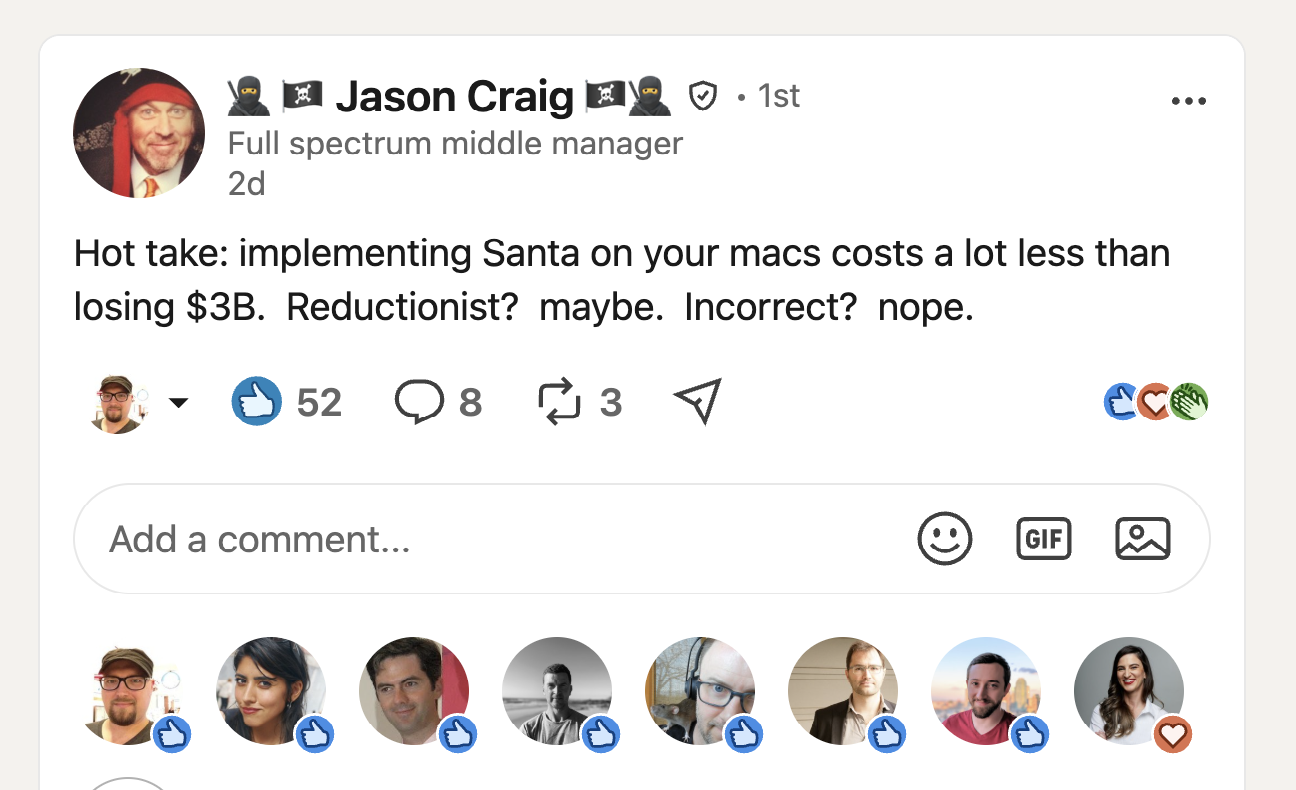
As the authors of Santa and Workshop, we figured we should weigh in. We agree with Jason.
This post describes what Santa and Workshop can do about the Binance attack:
- how to keep the payloads from running,
- how to lock down the tools and credentials the attackers leaned on, and
- how to require a human at the keyboard for the one command that mattered.
If you want to jump straight to action, the to-do list is at the end of the post.
How the attack worked
On November 3, Binance published its initial findings on the October 29 theft that affected about $6.34 billion in digital assets. The FBI attributes it to North Korea.
The last hop in the kill chain was a wallet signing service and an Ethereum delegation trick. But every step before that ran through an engineer’s Mac.
Binance was pretty candid about how the attackers got there. It wasn’t one phishing email. Over about five months, the attackers used:
- a tampered Homebrew install,
- a fake job interview,
- a trojaned
pyenv, - an internal AI tool,
- and a container deployment token sitting on a laptop.
Binance’s report describes four stages. Three different engineers were involved.
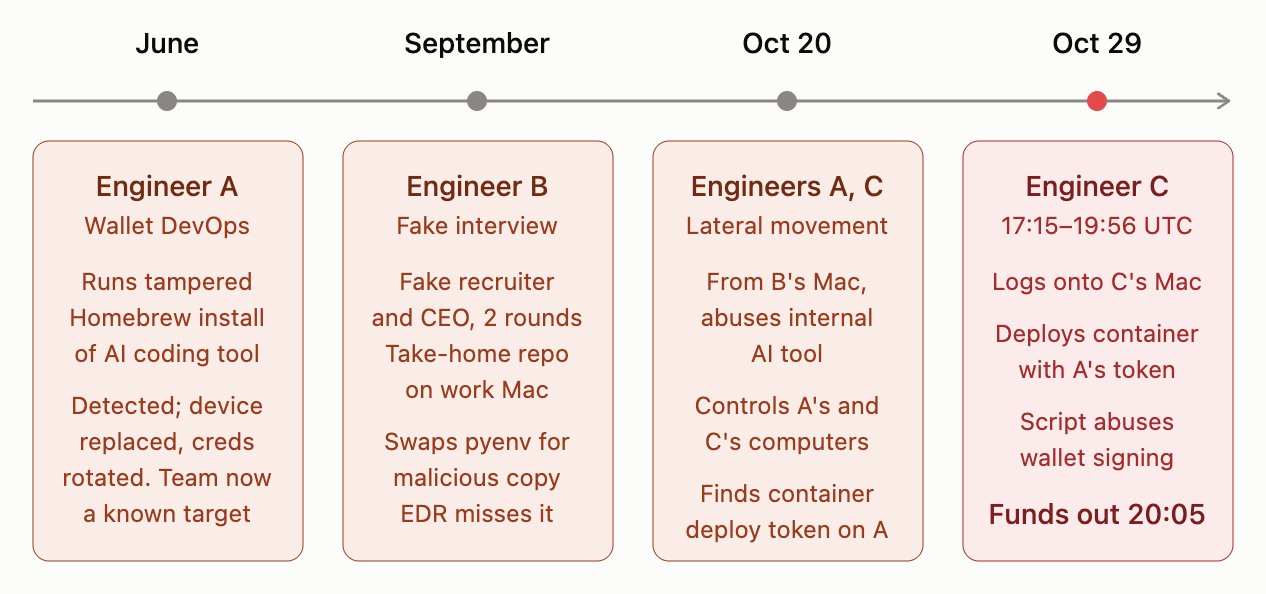
The pyenv swap is the one stage Binance shows in detail. The setup script created /opt/homebrew/Cellar/pyenv/2.8.0/libexec/pyenv_, deleted the real pyenv, renamed the new file into its place, deleted and re-created the /opt/homebrew/bin/pyenv symlink, and spawned zsh. From then on, every time B ran pyenv, they ran the attacker’s code.
There’s no exploit on the macOS side of this story. Nearly everything the attackers ran was a script inside a tool the developer already trusted, so binary authorization helps only so much. Santa decides what is allowed to execute. A malicious setup script running inside an allowed node or python isn’t a new execution, so even Lockdown mode won’t block it.
But Santa does see everything the attackers had to do next. To get anywhere, they had to:
- Write files where they don’t belong (Homebrew’s
Cellarandbin) - Read a credential file that has exactly one legitimate reader
- Spawn tools from an AI agent’s process tree
- Run a deploy from a Mac nobody was sitting at
Each of those actions is something Santa can prevent with execution rules, CEL, and file access rules.
Prevention: Keep the fake installer from running
Binance doesn’t say what the tampered installer dropped. Fake install pages promoted through search are a well-worn macOS delivery route, and they often end in an unsigned or ad-hoc signed Mach-O payload. In Lockdown mode, that payload is just another unknown binary, and Santa refuses to let it run. Santa doesn’t need to recognize the malware, which matters because the report says the later malware was previously unknown and nothing detected it.
The usual objection is that Lockdown is unlivable for developers. Package rules fix that by allowing software by its attested Homebrew, npm or Cargo package name, so the real AI coding tool installs and updates without anyone filing a ticket. The lookalike from a search ad isn’t in the catalog, so it goes through an approval workflow with the risk engine score attached.
There’s a second lesson here. After June, Binance knew Engineer A and his wallet team were being targeted. In Workshop, that knowledge becomes a tag. Put the targeted team on a tag that gets the strictest versions of every rule below, blocking instead of auditing, while the rest of the fleet stays in audit.
Prevention: Only Homebrew writes to Homebrew
Binance’s file log shows exactly what the take-home’s setup script did. It swapped Homebrew’s pyenv for its own copy and rebuilt the symlink. Nothing but Homebrew should ever create, rename or delete files under /opt/homebrew/Cellar/ or /opt/homebrew/bin/.
A data-centric file access rule says exactly that:
rule_type: PathsWithAllowedProcesses
path_prefixes:
  - "/opt/homebrew/Cellar/"
  - "/opt/homebrew/bin/"
options:
  allow_read_access: true
  audit_only: true
  block_message: "Only Homebrew may modify Homebrew-managed tools. Contact security if you need this."
processes:
  - cdhash: "<CDHash of Homebrew's portable Ruby>"
Homebrew writes to these directories through its bundled Ruby at /opt/homebrew/Library/Homebrew/vendor/portable-ruby/<version>/bin/ruby. That binary is ad-hoc signed and has no Team ID, so a Signing ID won’t match it. List it by CDHash instead.
Allowing that Ruby has a catch. Any script it runs can now write to the Cellar, and so can a setup script that calls it. So pin the interpreter to the brew command, with a CEL rule on the same CDHash:
// CDHASH rule on Homebrew's portable Ruby
path.startsWith('/opt/homebrew/Library/Homebrew/vendor/portable-ruby/') &&
!envs.exists(k, k.startsWith('RUBY') || k.startsWith('DYLD_')) &&
args.size() >= 4 && args[1] == '-W1' && args[2] == '--disable=gems,rubyopt' &&
(args[3] == '/opt/homebrew/Library/Homebrew/brew.rb' ||
 (args.size() >= 7 && args[3] == '-I' && !args[4].contains('..') &&
  args[4].split(':').all(p, p.startsWith('/opt/homebrew/Library/Homebrew')) &&
  args[5] == '--' &&
  args[6] in ['/opt/homebrew/Library/Homebrew/sandbox_operation.rb',
              '/opt/homebrew/Library/Homebrew/postinstall.rb',
              '/opt/homebrew/Library/Homebrew/utils/disclaim.rb']))
  ? ALLOWLIST : BLOCKLIST
This rule allows Homebrew’s Ruby to run brew.rb <command>, or one of a few helper scripts with a load path inside Homebrew’s own tree. Allowing only those calls blocks ruby -e, ruby /tmp/setup.rb, and attempts to inject code through RUBYOPT, RUBYLIB or a -I path elsewhere.
Ship both rules in audit, using AUDIT in place of BLOCKLIST for the CEL rule. Run brew update, upgrade and cleanup for a while. Check the events for writers or helper scripts this list misses, then switch both rules to block. On Santa 2026.9+, set parent directory protection to enforce, so a script can’t rename the directory and write to the copy. Once enforced, the setup script’s CREATE of pyenv_ fails, and pyenv stays the real pyenv.
A future version of Workshop will let a file access rule reference a package rule, so the process list picks up the hashes for each new Homebrew release on its own, without anyone editing the rule.
While the rule is still in audit, every event it logs is a non-Homebrew process writing to a Homebrew tool. That’s worth a Workshop Signal:
// Signal: something other than Homebrew modified a Homebrew-managed tool
has(event.file_access) &&
(event.file_access.Target.Path.startsWith('/opt/homebrew/Cellar/') ||
 event.file_access.Target.Path.startsWith('/opt/homebrew/bin/'))
The swapped pyenv then had to reach attacker infrastructure. If it fetched a compiled second stage, Lockdown blocks it as it would have blocked the first payload. If it lived off the land with curl, osascript or python3, Workshop’s network telemetry shows you which processes on a developer’s Mac talk to which destinations. Network rules can then block the combinations that never happen legitimately.
Prevention: Fence in the AI tool
Binance says the attacker used an internal AI tool from B’s Mac to gain control of A’s and C’s. They don’t say how.
On the endpoint, the agent’s actions look exactly like the engineer’s: same user, same credentials, same tools. When the agent runs kubectl or reads ~/.kube/config, nothing distinguishes it from the engineer doing it. You can’t write a rule that treats the two differently, and after an incident you can’t tell whose commands were whose. Agents also launch work through helpers and background services, so following parent and child processes loses the thread quickly.
Process annotations (Santa 2026.9+) make that practical. Mark the agent’s process, and the mark will follow everything it forks or execs, even after reparenting:
// SIGNINGID rule on your AI tool's agent/helper process
add_annotation(['ai-agent-{session}', 'ai-agent'], ALLOWLIST)
Now rules can ask “did this come from the AI tool?” A shell, ssh, kubectl or launchctl that the agent spawns can be audited, blocked, or held for Touch ID:
// SIGNINGID rule on platform:com.apple.ssh (repeat for curl, kubectl, launchctl)
has_annotation('ai-agent') ? REQUIRE_TOUCHID_ONLY : ALLOWLIST
Pair that with a process-centric file access rule that denies the agent’s helper the credential paths it never needs: ~/.kube/, ~/.docker/, ~/.ssh/, ~/.aws/, and wherever your deploy tokens live. Start in audit, because agents do read some config.
Prevention: Give the deploy token one reader
The attacker found a container deployment token on A’s computer and later used it from C’s. That’s a credential file with exactly one legitimate reader, which is the pattern from our Starving Shai-Hulud post. A data-centric file access rule with allow_read_access: false limits the token to your deploy CLI. A shell, cat, scp or an agent helper trying to read it is denied and logged, so the token never leaves A’s Mac.
File access rules have a known gap: they don’t stop an attacker who drives the allowed tool itself. That’s what the next control is for.
Prevention: Require a human for the deploy
Between 17:15 and 19:56, the attacker was logged onto Engineer C’s Mac, running commands. Depending on C’s location, there’s a good chance nobody was sitting at it. That makes the deploy a solid choke point to stop this attack, with one CEL rule:
// Rule on your deploy CLI (kubectl shown). Use SIGNINGID, CDHASH or BINARY, depending on how the CLI is signed.
args.exists(a, a in ['apply', 'create', 'run', 'rollout', 'set']) &&
args.exists(a, a.contains('wallet'))
  ? REQUIRE_TOUCHID_ONLY
  : ALLOWLIST
Tailor the match to your own namespaces and contexts. A remote session can’t press a finger to a Touch ID sensor. Use REQUIRE_PRESENCE_ONLY to accept Touch ID or a security key, which covers desktop Macs without a Touch ID sensor. The engineer who really is deploying sees one prompt. The attacker is stalled trying to deploy the new code, and the engineer sees a prompt they didn’t ask for, which is its own alarm.
Santa also supports time-based rules, so sensitive commands can require stronger authentication and authorization to run after hours.
Two more layers help here. Endpoint privilege management removes standing admin rights, which limits what an operator can install or persist. And every execution, file access and network event lands in Workshop telemetry, so “what ran on C’s Mac between 17:15 and 19:56?” is a SQL query, not a forensic engagement.
(By default, Santa accepts the user’s password in place of Touch ID, and an attacker who knows the password can type it remotely. For a control like this, set EnableStandalonePasswordFallback to false so only Touch ID or a security key works.)
What Santa and Workshop don’t cover
Today, Santa doesn’t have visibility into containers running on Linux VMs. Once a Linux container was running with a valid deployment token, the rest of this attack happened in Binance’s infrastructure and on-chain.
Santa also doesn’t stop a malicious script from starting inside an interpreter you allow, and it can’t see what an allowed process does in its own memory. Every control above works on the next thing the attacker has to do: run a binary, touch a file, open a connection, or launch a tool that needs a human present. And Santa doesn’t clean up a compromised Mac, though Workshop’s Kill process command can stop a running malicious process on the host.
Finally, Binance has withheld some details, including exactly how the AI tool was abused and how the attacker logged onto C’s Mac. The rules above are written for the techniques the report describes. Treat them as starting points and tune them to your own fleet.
Start with the people who can reach production
Binance says it detected and stopped 57 suspected North Korea-linked attempts this year before one got through. Fake interviews, trojaned developer tools, malicious packages and fake meeting apps are the playbook, and the people who can reach production are the targets. If that describes your engineers, here’s where to start:
- Turn on Lockdown for the people with production access first. Use package rules so their tools keep working, and a tag so they get the strictest policy.
- Put deploy and admin tools behind Touch ID or a security key. One CEL rule per tool on a laptop turns a stolen session into a dead end.
- Give every credential file one reader. Start with an audit-only file access rule over
~/.kube/,~/.docker/,~/.ssh/,~/.aws/and your deploy tokens, then enforce per path. - Lock the tool directories. Protect
/opt/homebrew/and other tool trees from writes by anything but their package manager. - Annotate your AI tools. Mark every agent that can and should run commands in your environment, and decide what its descendants may run and read.
- Make take-homes someone else’s problem. No interview assignment, however polite the recruiter, runs on a work Mac. Santa can enforce what your policy says.
None of these require Santa to know what the next North Korean payload looks like. That’s the point. The “0-day” in this report evaded detection. But it would not have evaded a control that says only Homebrew writes to Homebrew, and only a person at the keyboard deploys to the wallet cluster.
If you want help putting these rules in place, talk with us, or start with the cookbook.
And if you jumped straight to the action, here’s a link back to the story! 🧑🎄
You may also like

Closing the Tunnel: Santa and Workshop vs. the Claude Code Extension Backdoor
A backdoored Claude Code extension on the Cursor marketplace opens a reverse SSH tunnel. Find exposed Macs, block each stage, and contain them with Santa and Workshop.

Starving Shai-Hulud
The Shai-Hulud npm worm keeps coming back for developer credentials. Here is how Santa file access rules cut off its harvest.

Blocking OpenClaw
OpenClaw (formerly Clawdbot and Moltbot) is an autonomous AI agent for macOS. Here's how to block every version with layered Santa CEL rules.