
Binary Authorization
Binary authorization, also known as binary allowlisting (and formerly, binary whitelisting) is a feature that lets Santa control which binaries are run on the same machine. This is a powerful control for both security and policy enforcement.
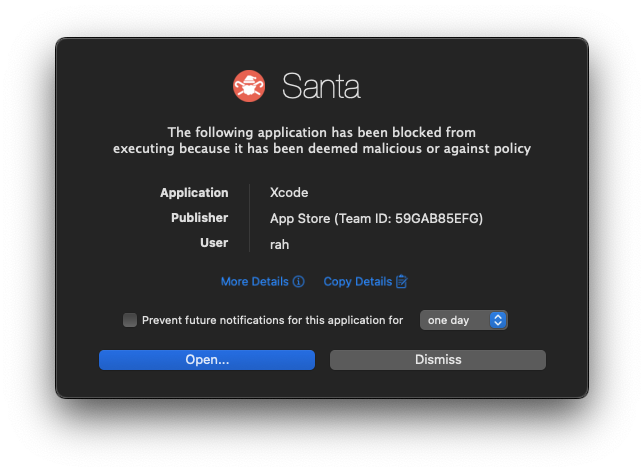
With Santa running, any time a binary is executed on the machine, Santa will decide whether the binary is allowed to be executed.
-
If the execution is allowed, everything will proceed as normal and Santa will cache its decision so that subsequent executions can avoid repetitive processing and execute faster.
-
If the execution is denied, Santa optionally presents a GUI notification over the top of any other windows detailing what was blocked.
Santa supports multiple mechanisms for controlling which executables are allowed to run, with as little friction as possible.
Rules
The primary mechanism for deciding what is able to run is Rules. Rules can
be synchronized from a server, configured statically in a profile, or managed
locally with santactl.
Rule Types
Santa supports several different rule types and follows a strict evaluation order when determining which rule to enforce for a given execution. The following diagram shows Santa’s rule precedence:
flowchart TD
    Start(["Execution Attempt"]) --> RuleCDHash("Rule: **CDHash**")
    RuleCDHash --> RuleBinary("Rule: **BINARY**")
    RuleBinary --> RuleSigningID("Rule: **SIGNINGID**")
    RuleSigningID --> RuleCertificate("Rule: **CERTIFICATE**")
    RuleCertificate --> RuleTeamID("Rule: **TEAMID**")
    RuleTeamID --> Scope("**Scope**")
    Scope --> ClientMode("**Client Mode**")
    ClientMode --> End(["Decision"])

    click RuleCDHash "#cdhash"
    click RuleBinary "#binary"
    click RuleSigningID "#signingid"
    click RuleCertificate "#certificate"
    click RuleTeamID "#teamid"
    click Scope "#scope"
    click ClientMode "#client-mode"
CDHash
Value: CDHASH
CDHash rules use a binary’s signed code directory hash as an identifier. This is the most specific rule in Santa. The code directory hash identifies a specific version of a program, similar to a file hash. Note that the operating system evaluates the CDHash lazily, only verifying pages of code when they’re mapped in. This means that it is possible for a file hash to change but a binary could still execute as long as modified pages are never mapped in.
Santa only considers CDHash rules for processes that run under Apple’s Hardened Runtime, to ensure that a process will be killed if the CDHash was tampered with (assuming the system has SIP enabled).
Binary
Value: BINARY
Binary rules use the SHA-256 hash of the entire binary file as an identifier. This means that if the binary file is tampered with in any way then the rule will not match.
SigningID
Value: SIGNINGID
Signing IDs are arbitrary identifiers under developer control that are given to
a binary at signing time. Typically, these use reverse domain name notation and
include the name of the binary (e.g. com.google.Chrome).
Because the signing IDs are arbitrary, the Santa rule identifier must be
prefixed with the Team ID associated with the Apple developer certificate used
to sign the application. For example, a signing ID rule for Google Chrome would
be: EQHXZ8M8AV:com.google.Chrome. For platform binaries (i.e. those binaries
shipped by Apple with the OS) which do not have a Team ID, the string platform
must be used (e.g. platform:com.apple.curl). The santactl fileinfo command
can be used to help find this information:
» santactl fileinfo /Applications/Santa.app
Path                   : /Applications/Santa.app/Contents/MacOS/Santa
SHA-256                : 66acf5c808ddb86c10137b5ae4c72cd14985ed2f90e5850d8e26ab962cb93c70
SHA-1                  : 259f6b0ffc9cccc069eab2aee1496f5a12072ee7
Bundle Name            : Santa
Bundle Version         : 2025.3.97
Bundle Version Str     : 2025.3
Team ID                : ZMCG7MLDV9
# highlight-next-line
Signing ID             : ZMCG7MLDV9:com.northpolesec.santa
CDHash                 : ea7c2330699c760b2d6c2c3e703fde01ca54e9b4
Type                   : Executable (arm64, x86_64)
Code-signed            : Yes
Rule : Allowed (SigningID)Certificate
Value: CERTIFICATE
Certificate rules are formed from the SHA-256 fingerprint of an X.509 leaf signing certificate. This is a powerful rule type that has a much broader reach than an individual binary rule. A signing certificate can sign any number of binaries. Allowing or blocking just a few key signing certificates can cover the bulk of an average user’s binaries. The leaf signing certificate is the only part of the chain that is evaluated. Though the whole chain is available for viewing.
Santa does not evaluate the Valid From or Valid Until fields, nor does it check the Certificate Revocation List (CRL) or the Online Certificate Status Protocol (OCSP) for revoked certificates. Adding rules for the certificate chain’s intermediates or roots has no effect on binaries signed by a leaf. Santa ignores the chain and is only concerned with the leaf certificate’s SHA-256 hash.
» santactl fileinfo /Applications/Santa.app
Path                   : /Applications/Santa.app/Contents/MacOS/Santa
SHA-256                : 66acf5c808ddb86c10137b5ae4c72cd14985ed2f90e5850d8e26ab962cb93c70
SHA-1                  : 259f6b0ffc9cccc069eab2aee1496f5a12072ee7
Bundle Name            : Santa
Bundle Version         : 2025.3.97
Bundle Version Str     : 2025.3
Team ID                : ZMCG7MLDV9
Signing ID             : ZMCG7MLDV9:com.northpolesec.santa
CDHash                 : ea7c2330699c760b2d6c2c3e703fde01ca54e9b4
Type                   : Executable (arm64, x86_64)
Code-signed            : Yes
Rule                   : Allowed (SigningID)
Signing Chain:
# highlight-next-line
    1. SHA-256             : 1afd16f5b920f0d3b5f841aace6e948d6190ea8b5156b02deb36572d1d082f64
       SHA-1               : 42890bc8a2a8becda00d63bdf9a89a6756a0da49
       Common Name         : Developer ID Application: North Pole Security, Inc. (ZMCG7MLDV9)
       Organization        : North Pole Security, Inc.
       Organizational Unit : ZMCG7MLDV9
       Valid From          : 2024/10/11 21:24:15 -0400
       Valid Until         : 2027/02/01 17:12:15 -0500

    2. SHA-256             : 7afc9d01a62f03a2de9637936d4afe68090d2de18d03f29c88cfb0b1ba63587f
       SHA-1               : 3b166c3b7dc4b751c9fe2afab9135641e388e186
       Common Name         : Developer ID Certification Authority
       Organization        : Apple Inc.
       Organizational Unit : Apple Certification Authority
       Valid From          : 2012/02/01 17:12:15 -0500
       Valid Until         : 2027/02/01 17:12:15 -0500

    3. SHA-256             : b0b1730ecbc7ff4505142c49f1295e6eda6bcaed7e2c68c5be91b5a11001f024
       SHA-1               : 611e5b662c593a08ff58d14ae22452d198df6c60
       Common Name         : Apple Root CA
       Organization        : Apple Inc.
       Organizational Unit : Apple Certification Authority
       Valid From          : 2006/04/25 17:40:36 -0400
       Valid Until         : 2035/02/09 16:40:36 -0500
TeamID
Value: TEAMID
The Apple Developer Program Team ID is a 10-character identifier issued by Apple and tied to developer accounts/organizations. This is distinct from Certificates, as a single developer account can and frequently will request/rotate between multiple different signing certificates and entitlements.
This is an even more powerful rule with broader reach than individual certificate rules and should be used with care.
» santactl fileinfo /Applications/Santa.app
Path                   : /Applications/Santa.app/Contents/MacOS/Santa
SHA-256                : 66acf5c808ddb86c10137b5ae4c72cd14985ed2f90e5850d8e26ab962cb93c70
SHA-1                  : 259f6b0ffc9cccc069eab2aee1496f5a12072ee7
Bundle Name            : Santa
Bundle Version         : 2025.3.97
Bundle Version Str     : 2025.3
# highlight-next-line
Team ID                : ZMCG7MLDV9
Signing ID             : ZMCG7MLDV9:com.northpolesec.santa
CDHash                 : ea7c2330699c760b2d6c2c3e703fde01ca54e9b4
Type                   : Executable (arm64, x86_64)
Code-signed            : Yes
Rule                   : Allowed (SigningID)
Policies
Once a rule has been found that matches a given executable, the action to take is based on the policy attached to the rule. Santa supports several policies.
Allowlist
Value: ALLOWLIST
The binary is allowed to execute and this decision is cached such that subsequent executions of the same binary will not be processed to increase performance.
Allowlist Compiler
Value: ALLOWLIST_COMPILER
If Santa is configured to enable transitive allowlisting then the binary is allowed to execute and any files that it writes will be read upon closing (or renamed) to check whether they are Mach-O binaries.
When a Mach-O binary has been written by an allowed compiler, a transitive rule will be created for it that is valid for 6 months. This rule will allow that binary only on the machine that it was created on.
The purpose of transitive allowlisting is to allow developers to live in
Lockdown mode while still being able to do local development. Allowlisting the
final process in a build toolchain (usually a linker or the codesign tool)
will usually allow developers to work as normal.
If transitive allowlisting is not enabled, the rule will be treated as if it were a regular Allowlist rule.
Blocklist
Value: BLOCKLIST
The execution will be blocked. This will be the case even if the host is in Monitor or Standalone mode, and it will not be possible to override.
Blocklist rules are intended to block applications that an organization deems to be malicious or against policy. Rules can have custom messages attached to them, which override the default message shown when Santa blocks an application. This can be used in Blocklist rules to inform users why a particular application is blocked.
Silent Blocklist
Value: SILENT_BLOCKLIST
Silent Blocklist rules are identical to normal Blocklist rules but no notification is shown when such a rule is triggered: both the GUI dialog and the terminal (TTY) message are suppressed.
This rule type should be used sparingly. Blocking an application without informing the user that it was Santa that did it can be a very confusing experience for users and lead to wasted time trying to determine the underlying cause.
Silent GUI Blocklist 2026.6
Value: SILENT_GUI_BLOCKLIST
Identical to Silent Blocklist but suppresses only the GUI dialog; the terminal (TTY) message is still shown.
Silent TTY Blocklist 2026.6
Value: SILENT_TTY_BLOCKLIST
Identical to Silent Blocklist but suppresses only the terminal (TTY) message; the GUI dialog is still shown.
CEL 2025.6
Value: CEL
CEL (Common Expression Language) rules allow for more complex policies than would normally be possible. A rule with this policy must also include a valid CEL expression which will be evaluated as part of making a decision.
The input to the expression will be an
santa.cel.v1.ExecutionContext
and the return value must either be a
santa.cel.v1.ReturnValue
or a bool. If the return value is a bool, true will be treated as a
ReturnValue.ALLOWLIST and false will be treated as ReturnValue.BLOCKLIST.
The accessed fields in the ExecutionContext will determine whether the result
of the expression can be cached. This is very important to be aware of, as
overuse of CEL rules that prevent caching can have a negative impact on system
performance, especially for binaries that are executed frequently.
The following fields are available on the target object:
| Field | Type | Description |
|---|---|---|
target.signing_id | string | Signing ID of the target binary, prefixed with Team ID or platform (e.g. EQHXZ8M8AV:com.google.Chrome or platform:com.apple.curl) |
target.signing_time | timestamp | Code signing timestamp (developer-provided) |
target.secure_signing_time | timestamp | Secure code signing timestamp (from a timestamp authority) |
target.is_platform_binary | bool | Whether the binary is signed with Apple platform certificates |
target.team_id | string | Team ID from the binary’s code signature |
The following additional fields are available in the execution context:
| Field | Type | Description |
|---|---|---|
path | string | File path of the executable |
args | list<string> | Command-line arguments passed to the binary |
envs | map<string, string> | Environment variables available to the process |
euid | int | Effective user ID (0 for root, etc.) |
cwd | string | Current working directory of the process |
ancestors | list<Ancestor> | Ancestor processes, ordered from the immediate parent at index 0 up to launchd at the end of the list. Only populated for Workshop customers. Requires Santa 2026.2+ |
Each entry in ancestors has the following fields:
| Field | Type | Description |
|---|---|---|
path | string | File path of the ancestor’s executable |
signing_id | string | Signing ID of the ancestor, prefixed with Team ID or platform (e.g. EQHXZ8M8AV:com.google.Chrome or platform:com.apple.bash) |
team_id | string | Team ID from the ancestor’s code signature |
cdhash | string | Code directory hash of the ancestor |
args | list<string> | Command-line arguments the ancestor was launched with. Requires Santa 2026.3+ |
In addition to the CEL standard library
(including timestamp, duration, and the arithmetic between them), the
following helper functions are available. They require Workshop:
| Function | Returns | Description |
|---|---|---|
today() | timestamp | The start of the current day in the host’s local time zone. Combine with duration arithmetic to compare against a sliding window, e.g. target.secure_signing_time > today() - days(90). Any expression using today() is not cacheable, as its value changes each day. Before Santa 2026.8 this was the start of the current UTC day. |
today(tz) | timestamp | The start of the current day in the named time zone, for rules whose calendar must be the same fleet-wide. tz is "local", an IANA name such as "America/New_York" or "UTC", or a fixed "+05:30" offset. Not cacheable. Requires Workshop and Santa 2026.8+ |
days(n) | duration | A duration of n days (n×24h). Convenience for day-length windows, since the standard duration() only parses units up to hours (days(90) is equivalent to duration('2160h')). |
now() | timestamp | The current instant, with no truncation. Any expression using now() is not cacheable. Requires Workshop and Santa 2026.8+ |
weekdays() | list<int> | The constant [1, 2, 3, 4, 5], Monday through Friday, in the 0 (Sunday) through 6 (Saturday) numbering used by policy_for_range() and getDayOfWeek(). Requires Workshop and Santa 2026.8+ |
policy_for_range(...) | policy | Returns one policy while a time window is open and another while it is closed. Four forms: a weekly HH:MM window on the host’s clock, the same window in a named time zone, a fixed span between two timestamps, or a duration counted from the execution. Never cacheable. See Time Based Rules. Requires Workshop and Santa 2026.8+ |
kill_on_expiry(policy) | policy | Wraps the in-range policy of policy_for_range() so the processes the rule allowed are quit when the window closes. Accepts only policies that let a process start. See Time Based Rules. Requires Workshop and Santa 2026.8+ |
add_annotation(names, propagation, policy) | policy | Annotates the executing process with names (a string or a list of strings) and returns policy unchanged. propagation is how far the annotation follows the process’s descendants: NONE, FORK_ONLY, EXEC_ONLY or FORK_AND_EXEC. The form without propagation uses FORK_AND_EXEC. Every {session} in a name is replaced with an ID for this execution of the process, so each run of a tool gets its own annotation. The ID is the process’s PID and PID version, so claude-code-{session} becomes e.g. claude-code-4521-18734. Must produce the rule’s result. Never cacheable. Requires Workshop and Santa 2026.9+ |
has_annotation(name) | bool | Whether the executing process carries the annotation name. Names match exactly and {session} is not expanded, so if a rule needs has_annotation(), attach both the unsuffixed and suffixed versions of the annotation, e.g. add_annotation(['claude-code-{session}', 'claude-code'], ALLOWLIST). Never cacheable. Requires Workshop and Santa 2026.9+ |
Some examples of valid CEL expressions:
// Only allow executing versions of an app signed on or after May 31st 2025.
// This expression will be cacheable.
target.signing_time >= timestamp('2025-05-31T00:00:00Z')

// Only allow apps securely signed within the last 90 days. The window slides
// automatically each day. Requires Workshop.
// This expression will NOT be cacheable.
target.secure_signing_time > today() - days(90)

// Only allow the app from 09:00 to 17:00, Monday through Friday, on the host's
// own clock, and block it at any other time. Requires Workshop and Santa 2026.8+.
// See /features/time-based-rules. This expression will NOT be cacheable.
policy_for_range(weekdays(), '09:00', '17:00', ALLOWLIST, BLOCKLIST)

// Annotate each run of Claude Code and everything it starts. The session
// annotation groups executions by run; the plain one is what a fallback rule
// can test for with has_annotation('claude-code'). Requires Workshop and
// Santa 2026.9+. This expression will NOT be cacheable.
// If Claude Code runs as PID 4521 with PID version 18734, it and everything it
// starts get both claude-code-4521-18734 and claude-code.
add_annotation(['claude-code-{session}', 'claude-code'], ALLOWLIST)

// Only allow Chrome from this team, block other apps.
// Useful when attached to a TEAMID rule to allow a specific app.
// This expression will be cacheable.
target.signing_id.contains('com.google.Chrome') ? ALLOWLIST : BLOCKLIST

// Prevent using the --inspect flag.
// This expression will NOT be cacheable.
'--inspect' in args ? BLOCKLIST : ALLOWLIST

// Block all executions with DYLD_INSERT_LIBRARIES environment variable set.
// This expression will NOT be cacheable.
! has(envs.DYLD_INSERT_LIBRARIES)

// Only allow execution by non-root users. Requires Santa 2025.12+
euid != 0

// Disallow execution from inside /Library/LaunchDaemons. Requires Santa 2025.12+
cwd != '/Library/LaunchDaemons'

// Only allow platform binaries from a specific path.
// This expression will NOT be cacheable.
target.is_platform_binary && path.startsWith('/usr/bin/')

// Block executions whose immediate parent is Terminal. Requires Santa 2026.2+
// ancestors[0] is the immediate parent; the last entry is launchd.
size(ancestors) > 0 && ancestors[0].path.endsWith('/Terminal') ? BLOCKLIST : ALLOWLIST
Rule Dictionary Format
When defining rules in a plist (for StaticRules or import/export), each rule is represented as a dictionary with the following keys:
Keys
| Key | Type | Required | Description |
|---|---|---|---|
identifier | String | Yes | The identifier for the rule. The format depends on the rule_type (see Identifier Format below). |
policy | String | Yes | The action to take when the rule matches. See Supported Policies. |
rule_type | String | Yes | The type of rule. See Rule Types for values. |
custom_msg | String | No | A custom message displayed in the block notification when this rule blocks execution. |
custom_url | String | No | A custom URL the user can visit for more information when blocked. Supports the same placeholders as EventDetailURL. |
comment | String | No | A comment or note about the rule (for documentation purposes). |
cel_expr | String | No | A CEL expression for the rule. Required if policy is CEL. |
Identifier Format
The format of the identifier value depends on the rule_type:
| Rule Type | Identifier Format | Example |
|---|---|---|
BINARY | SHA-256 hash (64 hex characters) | a1b2c3d4... (64 chars) |
CERTIFICATE | SHA-256 hash (64 hex characters) | a1b2c3d4... (64 chars) |
TEAMID | 10-character alphanumeric Team ID | EQHXZ8M8AV |
SIGNINGID | TeamID:SigningID format | EQHXZ8M8AV:com.google.Chrome |
CDHASH | Code Directory Hash (40 hex characters) | ea7c2330699c760b2d6c2c3e703fde01ca54e9b4 |
For SIGNINGID rules targeting platform binaries (those shipped with macOS),
use platform as the Team ID prefix (e.g., platform:com.apple.curl).
Supported Policies
| Value | Description |
|---|---|
ALLOWLIST | Allow execution |
ALLOWLIST_COMPILER | Allow execution and enable transitive allowlisting (if configured) |
BLOCKLIST | Block execution |
SILENT_BLOCKLIST | Block execution without showing any notification (GUI and TTY) |
SILENT_GUI_BLOCKLIST | Block execution, suppressing only the GUI notification |
SILENT_TTY_BLOCKLIST | Block execution, suppressing only the TTY notification |
CEL | Evaluate a CEL expression to determine the action |
Example Rules
Rules are typically provided either as part of the
StaticRules configuration key or from a
sync server. Below are examples of individual rule dictionaries.
Block a specific binary by SHA-256 hash:
<dict>
    <key>identifier</key>
    <string>a1b2c3d4e5f6...</string>
    <key>rule_type</key>
    <string>BINARY</string>
    <key>policy</key>
    <string>BLOCKLIST</string>
    <key>custom_msg</key>
    <string>This application is not permitted by company policy.</string>
</dict>
Allow all apps from a specific Team ID:
<dict>
    <key>identifier</key>
    <string>EQHXZ8M8AV</string>
    <key>rule_type</key>
    <string>TEAMID</string>
    <key>policy</key>
    <string>ALLOWLIST</string>
</dict>
Allow a specific Signing ID:
<dict>
    <key>identifier</key>
    <string>EQHXZ8M8AV:com.google.Chrome</string>
    <key>rule_type</key>
    <string>SIGNINGID</string>
    <key>policy</key>
    <string>ALLOWLIST</string>
</dict>
CEL rule to only allow recently signed versions:
<dict>
    <key>identifier</key>
    <string>EQHXZ8M8AV:com.google.Chrome</string>
    <key>rule_type</key>
    <string>SIGNINGID</string>
    <key>policy</key>
    <string>CEL</string>
    <key>cel_expr</key>
    <string>target.signing_time >= timestamp('2025-01-01T00:00:00Z')</string>
</dict>
When using StaticRules, these dictionaries are placed in an array under the
StaticRules key in a configuration profile. When received from a sync server,
the same structure is used but in JSON format.
Rule Layering
Since Santa is a first match system, there are some interesting ways you can layer rules to achieve different policies.
For example if you want to allow all applications from a publisher (e.g. the Acme software company) you might start with an allow rule for the TeamID (ABCDEF1234) to allow all applications from that publisher.
However if you then need to prevent a specific cloud-storage application written by the same provider, you can then use a higher precedence SigningID rule to block that company’s cloud storage product.
Using santactl this would look like the following:
santactl rule --allow --teamid --identifier ABCDEF1234

santactl rule --block \
              --signingid \
              --identifier ABCDEF1234:com.acme-example.cloud-storage
You could also do the inverse and block everything by a publisher but allow a specific application by having a TeamID block rule and a SigningID allow rule.
For example if you instead wanted to block everything from the Acme company
except for the company’s cloud storage product you’d make a TeamID block rule
for ABCDEF1234 and a SigningID allow rule for the specific cloud storage
product.
Using santactl this would look like the following:
santactl rule --block --teamid --identifier ABCDEF1234

santactl rule --allow \
              --signingid \
              --identifier ABCDEF1234:com.acme-example.cloud-storage
Scope
In addition to rules, Santa can allow or block based on scopes. Currently, only a few scopes are implemented. Scopes are evaluated after rules, with block evaluation preceding allow.
| Scope | Allow/Block | Configurable | Description |
|---|---|---|---|
| Blocked Path Regex | Block | Yes | A regex which the binary path is executed from is matched against. If the path matches the regex, the execution is blocked. |
| Bad Signature Protection | Block | Yes | If enabled, a binary that is executed with a bad signing chain will be blocked. |
| Allowed Path Regex | Allow | Yes | A regex which the binary path is executed from is matched against. If the path matches the regex, the execution is allowed. |
Client Mode
If Santa hasn’t made a decision based on existing Rules or due to a scope, the
action that is taken depends on what mode Santa is running in. In
event/telemetry output this is the UNKNOWN case:
-
Monitor: All unknown executions are allowed.
-
Lockdown: All unknown executions are blocked.
-
Standalone: All unknown executions are held until the user approves them, with Touch ID, a security key, or their password. If they approve the execution the execution is allowed to continue (without requiring re-execution) and a local SigningID or SHA-256 rule is automatically created.
User Authorization 2026.9
A CEL rule can hold an execution until the user authorizes it. The return value chooses what the user has to present:
| Value | The user must authorize with |
|---|---|
REQUIRE_TOUCHID | Touch ID (or a password, if EnableStandalonePasswordFallback is set) |
REQUIRE_SECURITY_KEY | A touch on a FIDO2 hardware security key attached to the Mac |
REQUIRE_PRESENCE | Either of the above |
Each has an _ONLY variant that goes straight to the authorization prompt
without showing the usual Santa block dialog, and a
<value>_with_cooldown_minutes(N) helper that caches an approval for N
minutes. An approval is cached against the method that was used, so an approval
given with Touch ID never satisfies a later REQUIRE_SECURITY_KEY hold.
Standalone client mode asks for presence, so either will do there too.
Security Keys
Nothing needs enabling. A rule that returns REQUIRE_SECURITY_KEY or
REQUIRE_PRESENCE is itself the opt-in, and Standalone mode asks for presence,
so a user with a key can approve with it on a Mac that has no Touch ID.
A REQUIRE_SECURITY_KEY hold with no key attached is denied. A
REQUIRE_PRESENCE hold falls back to Touch ID, because the user was never asked
for anything.